Aquila Streaming and Aquila Broadcast use the Controller to manage the headend. Both use Live Encoder for video and radio services. For streaming delivery, the Packager prepares the encoded streams for playback. For broadcast delivery, the Multiplexer combines streams into an output transport stream.

## Components

- [Controller](/traditional-products-and-appliances/components/controller): Connect to the headend and manage services, servers, licences, and alarms.
- [Live Encoder](/traditional-products-and-appliances/components/live-encoder): Configure live encoding for streaming or broadcast.
- [Packager](/traditional-products-and-appliances/components/packager): Configure packaging and delivery for Aquila Streaming.
- [Multiplexer](/traditional-products-and-appliances/components/multiplexer): Configure multiplexing for Aquila Broadcast.
- [Reliable Transport](/traditional-products-and-appliances/components/reliable-transport): Carry contribution or distribution streams over IP networks.

For Packager configuration examples, see [Packager use cases](/traditional-products-and-appliances/components/packager/use-cases). For Microsoft Smooth Streaming (HSS) outputs, see [HSS output settings](/traditional-products-and-appliances/components/packager/hss-output) and the [HSS over TS parameter reference](/traditional-products-and-appliances/components/packager/parameters/hss-over-ts).

### Processing services

<table>
  <thead>
    <tr>
      <th style="text-align: left">Service</th>
      <th style="text-align: left">Role in the headend</th>
    </tr>
  </thead>
  <tbody>
    <tr>
      <td style="text-align: left">Live Encoder</td>
      <td style="text-align: left">Encodes live video using MPEG-2, MPEG-4 AVC, or HEVC for satellite, cable, IPTV, and internet delivery.</td>
    </tr>
    <tr>
      <td style="text-align: left">Packager</td>
      <td style="text-align: left">Ingests streams, manages buffering and storage, packages and encrypts content just in time, and acts as the origin server for Aquila Streaming.</td>
    </tr>
    <tr>
      <td style="text-align: left">Reliable Transport</td>
      <td style="text-align: left">Sends and receives content between headends over public or private IP networks using SRT, RIST, or Zixi.</td>
    </tr>
  </tbody>
</table>

## Headend architecture

The management layer deploys applications on the nodes, stores service configurations, and monitors the headend. The processing layer runs the encoding, packaging, multiplexing, and transport applications. The infrastructure layer provides the underlying servers and can run in a data centre. Once running, the processing applications can continue to process services if they lose their connection to the management layer.

![Aquila management, processing components, and server infrastructure.](/images/aquila-guide/headend-architecture.webp)

The Controller provides a common web interface and REST API for starting and stopping services, assigning servers, and managing failover. Templates let you prepare service configurations before putting them into operation. See [Manage services](/traditional-products-and-appliances/components/controller/services), [Manage templates](/traditional-products-and-appliances/components/controller/templates), and [Manage failover](/traditional-products-and-appliances/components/controller/failover).

### Licensing

A central licence server holds the processing rights. A service takes the rights it needs when it starts and releases them when it stops. Open the **Licenses** tab on a server with the **Licensing** processing type to check usage, expiry, and availability by feature. See [Manage licenses](/traditional-products-and-appliances/components/controller/licenses) for the Controller procedure.

### Monitoring and access

The management nodes collect logs and metrics from applications and infrastructure across the headend. For short-term monitoring, each processing component sends its input and output statistics to the Controller. You can monitor individual services in the web interface or retrieve statistics through the API. The Controller can also forward Simple Network Management Protocol (SNMP) traps to an external monitoring system. See [Manage alarms and events](/traditional-products-and-appliances/components/controller/alarms-events).

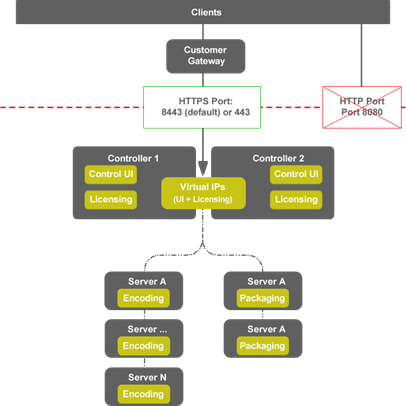
User management is enabled by default for the web interface. In a redundant deployment, a virtual IP address provides a single entry point to the active Controller. See [Controller architecture](/traditional-products-and-appliances/components/controller/system-architecture) and [Connect to the Controller](/traditional-products-and-appliances/components/controller/connection). To authenticate operators against your directory, see [LDAP management](/traditional-products-and-appliances/components/controller/system-administration/ldap-management).

<blockquote data-callout="caution"><strong>Operating system updates</strong><p>On installations covered by this Aquila guide, update the Linux operating system only through MediaKind security packages. These packages update operating system libraries, and MediaKind tests the products with those updates installed.</p></blockquote>

### Deployment and redundancy

The headend can run on a single stand-alone node or across several nodes. The management layer includes the Controller, deployment toolkit, and licence servers. For high availability, the recommended deployment uses three management nodes and a redundant pair of licence servers. Dedicated licence servers can serve several deployments. In a single deployment, they can share nodes with the management servers.

Enable HTTPS for access to the Controller UI and API. In a redundant system, connect through the virtual IP so requests reach the active Controller. See [Connect to the Controller](/traditional-products-and-appliances/components/controller/connection) and the [hardware guides](/traditional-products-and-appliances/hardware-guides) for your server.
![Clients reach the redundant Controllers through a gateway over HTTPS. A virtual IP provides access to the Controller interface and licensing.](/images/aquila-guide/controller-access.png)
