Note## Configure the Mux To configure the Mux, follow these steps: 1. From the **Stream Processing** tab, click **Transport stream**. 2. Go to the **Properties** > **Mux** sub-tab: 1. Check the **Total Bitrate**. If needed, you can modify it. 2. To minimize the delay through the chain, set the following parameters in the **Advanced settings** section: - **Input jitter buffer latency** to **40** ms - **Scrambling latency** to **10** ms 3. From the **Properties** > **Output** sub-tab, check the pre-defined parameters. 4. Click **Save and continue** to save your changes. ## Configure the encryption (scrambling)Other parameters are already configured.
BISS-CA timingTo configure the encryption, follow these steps: 1. Go to the **Scrambling** tab: - Drag and drop the service under the **Scrambling Groups** tree. - Click the scrambling group to configure the encryption parameters as required. Some parameters appear in the **Advanced settings**. 2. Click **Save and exit** to save and finalize your service configuration. ## ASI output Latency The ASI output buffer latency on the Dektec 2174b card can be configured manually when using the Live Encoding + Multiplexer feed type.Observe these timing constraints when configuring BISS-CA:
- For a nonzero session key period, use a period greater than 60 seconds and a multiple of the session word period. See Configure stream process encryption.
- BISS-CA To ensure interoperability with RX8200, the encoder needs to set Additional Descrambler Delay to 60 seconds.
- BISS-CA timings are not accurate - when session word and session key change at same time.
- Select a session word period greater than the additional descrambler delay and no longer than the session key period.
NoteTo configure the ASI output buffer latency, follow these steps: 1. From the **Stream Processing** tab, click **Transport stream**. 2. Go to the **Output** tab then check that **ASI** output type is selected in the **Output** tab: 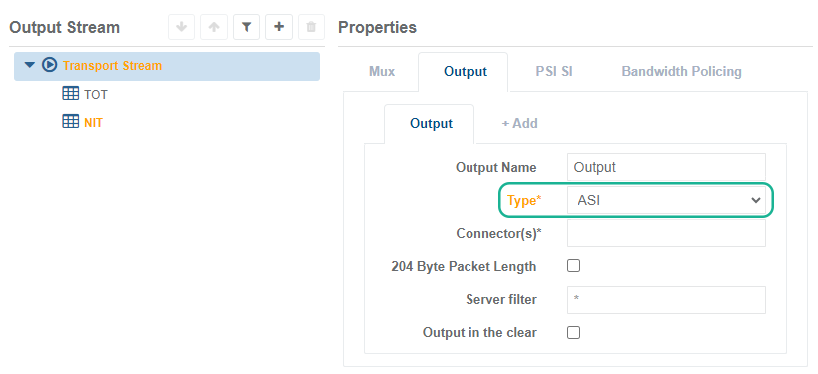 3. Go to the **Mux** tab then unfold the **Advanced Settings** submenu. You can set the **ASI output buffer latency**. Latencies below 50 ms are not recommended. 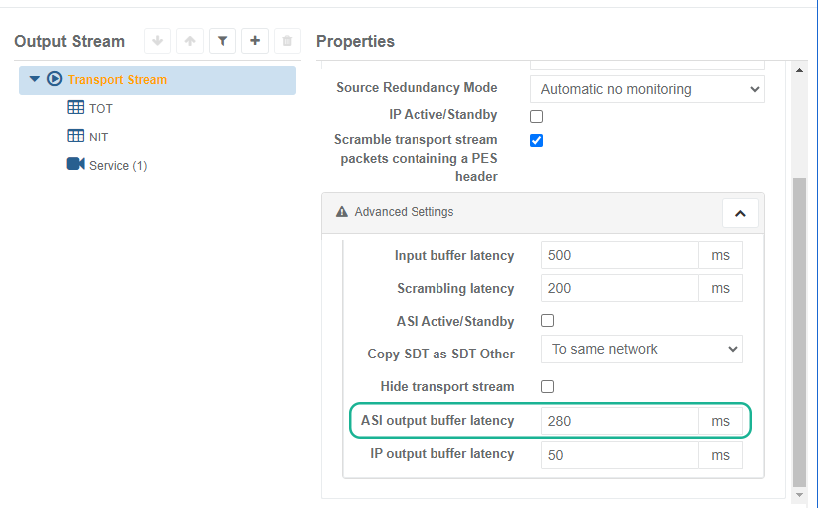 4. Click **Save and continue** to save your changes.This setting only works with Dektec 2174b cards when being used as ASI output cards. It will be ignored for Deltacast cards and Dektec cards being used as ASI input cards.