When configuring any network interface settings, the front panel must be used.
To configure a network interface:
1. [You set the method](/traditional-products-and-appliances/products/ce1/howto/configure-nics#enable-or-disable-a-network-interface) to enable or disable the network interface.
2. If **Manual**, [you can manually set the IP address, subnet mask and gateway](/traditional-products-and-appliances/products/ce1/howto/configure-nics#manually-set-the-ip-address-subnet-mask-and-gateway).
## Front panel menu structure and navigation
Below is the front panel menu structure:
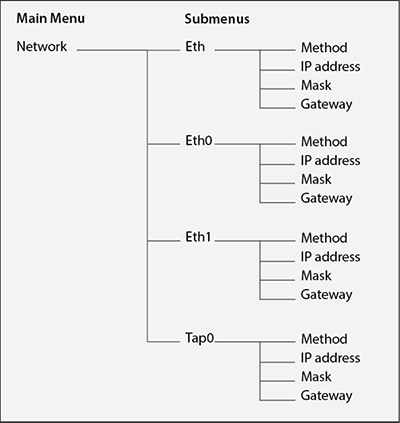
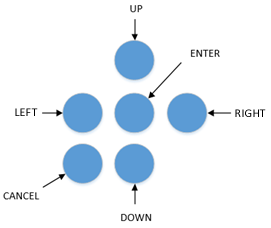
The following buttons on the front panel can be used to navigate into the menus, make selections, and configure the IP addresses.
1. Use the **UP**, **DOWN**, **LEFT** and **RIGHT** buttons to navigate and select the parameter to be changed.
2. Use the **UP** and **DOWN** buttons to adjust the value.
3. Press **ENTER** to apply the new value.
## Enable or disable a network interface
Setting the **Method** option allows you to:
- Disable the network port.
- Enable a port and set its IP Address, subnet mask and gateway.
- Enable a port to take DNS setting of the IP address, subnet mask and gateway.
Possible options:
- **Disabled**: The sub-menus for the **IP Address**, **Subnet Mask** and **Gateway** are not displayed.
- **Manual**
- The sub-menus for **IP Address**, **Subnet Mask** and **Gateway** are displayed.
- The menus have default settings for the **IP Address** and **Subnet Mask**, and the **Gateway** defaults to 000.000.000.000.
NoteOnce the Gateway is set, the Automatic Method cannot be selected (the Method setting will revert to Manual).
- **Automatic**
- DNS on the network: the sub-menus for **IP Address**, **Subnet Mask** and **Gateway** are displayed and are read-only.
- No DNS on the network: the sub-menus for **IP Address**, **Subnet Mask** and **Gateway** are displayed but report **None**.
NoteTo select the Automatic method for a port where the gateway has been manually configured, the port must be first set to Disabled then set to Automatic.
## Manually set the IP address, subnet mask and gateway
To manually edit the **IP Address**, **Subnet Mask** and **Gateway**, follow these steps:
1. Press the **ENTER** button.
2. Navigate the setting of the digits in the octets using Left/Right to select digits and Up/Down to modify their value (see [Front panel menu structure & navigation](/traditional-products-and-appliances/products/ce1/howto/configure-nics#front-panel-menu-structure-and-navigation)).
- The setting of the **subnet Mask** will affect the valid settings for the **Gateway**.
- A single default gateway should be configured. This can be set on either eth0 or eth1 but the default gateway should not be set on two interfaces.
- The **Network** submenu contains an entry for the tap0 interface. This is an internal interface, leave it set to the default.
3. Press **ENTER** to save.