
Live Encoder supports out-of-band conditioning via SCTE-104/IP, on the same principle as ESAM.
- Live Encoder can receive conditioning triggers from an external server, using SCTE-104 over IP messages.
- Once received, SCTE-104 messages are decoded, sent to the targeted channel (based on DPI PID index) and converted in SCTE-35 in order to enable stream conditioning actions.
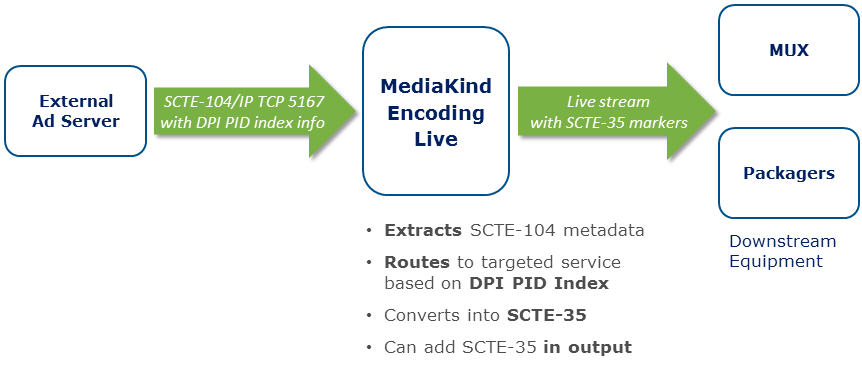 SCTE-104 out-of-band IP conditioning
Configure SCTE-104/IP out-of-band metadata
Before you start, ensure that you have added and configured the SCTE-104/IP out-of-band metadata in the input stream.
Configuring SCTE-104/IP out-of-band metadata requires multiple steps:
Configure the metadata encoding
-
From the Encoding tab, go to the Metadata encoding section.
-
For each SCTE-104/IP metadata, click
 in the Actions column then set the Codec to Conditioning.
Encoded metadata selection shows Conditioning as its codec. The form includes Use POIS, PTS insertion compensation, and Recover conditioning state if failover.
-
Click Ok to validate.
Configure the video encoding
-
Go to the Video encoding section.
-
For each video stream, select the associated Stream Conditioning.
The Stream conditioning field identifies the encoded metadata stream.
-
Click Ok to validate.
Add the SCTE-35 conditioned stream related to the SCTE-104/IP to the output
-
Go to the Output tab.
-
Go to the Output streams section, then click either the Add button (if no stream has been selected) or
in the Actions column. -
For each video stream, tick the associated Stream Conditioning.
In the Output stream list, the metadata description is SCTE-35 Conditioning.
-
Click Ok to validate. You should see the selected streams in the list of output streams.