The receiver offers the ability to convert from HDR input material to SDR output for decoded video (i.e. compress the dynamic range of a high dynamic range input video stream to be compatible with a standard dynamic range video system).
The receiver can support conversion of input video with HDR content in the following standards:
- PQ10/HDR10
- HLG10
The inputs of those standards will be compressed into a signal that supports standard dynamic range gamma curves as defined in BT.2020 and BT.709 using the tone map look up table selected.
Select the HDR Down-conversion mode
To select the HDR down-conversion mode, follow these steps:
-
From the homepage, select the Servers menu, then click
 in the Actions column to view server information.
-
Navigate to the Appliance tab, then select the HDR->SDR Conversion tab on the resultant window.
-
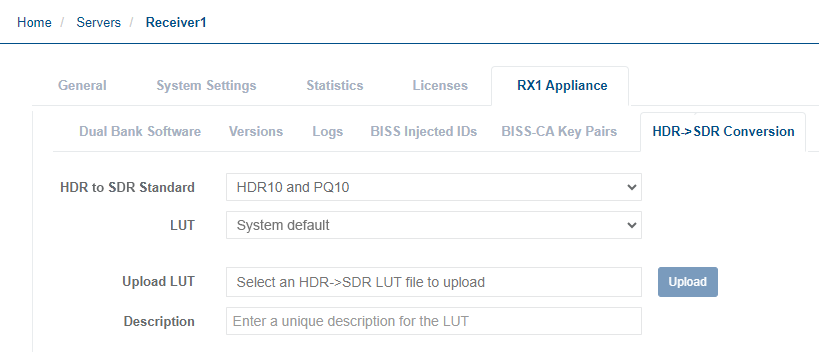
Select the required standard using the HDR to SDR standard drop down list. The possible values are HDR10 and PQ10 or HLG10.
Upload Custom LUTs
Each of the above modes can be supported by either a default LUT or a custom LUT (Look UP Table) uploaded into the unit (uploaded as a .cube file), these should be 3D LUTs of size 33.
The unit can upload 5 custom LUTs.
To upload and select a LUT, follow these steps:
-
Navigate to the HDR->SDR Conversion tab as detailed above.
-
Select the Upload LUT textbox. A file explorer window will appear.
-
Navigate to the LUT file to upload. Note that the receiver will only accept LUT files in
.cubeform. -
At this stage, a description of the LUT may be added.
-
Once the file has been selected click the Upload icon.
Select Custom LUTs
The user can select from default or custom LUTs uploaded.
To select the required LUT, follow these steps:
-
Navigate to the HDR->SDR Conversion tab as detailed above.
-
From the LUT drop down select the desired LUT (either default or an uploaded custom LUT).
Configure HDR to SDR Decoding Per Service
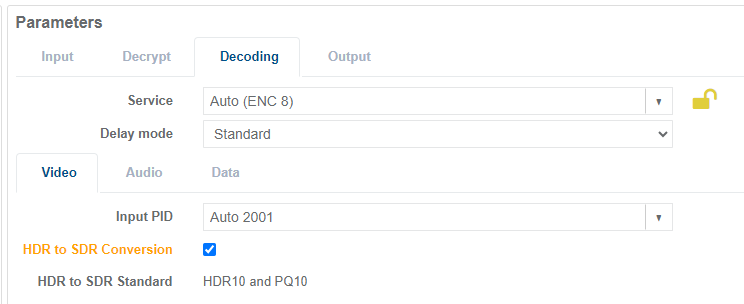
The user can enable HDR to SDR conversion for each decode service.
To do this, follow these steps:
-
From the Home page, select the RECEIVER item from the required feed then click
 .
-
From the Parameters section, select the Decoding tab.
-
Tick the HDR to SDR conversion checkbox.