
Prerequisites for using an External sync
- The studio feed must be of the same frequency as the video service being decoded by the receiver.
- If multiple services are being decoded they must all be of the same frequency:
- 50 Hz (field timing for interlaced or frame timing for progressive)
- 59.94 Hz (field timing for interlaced or frame timing for progressive)
Contribution decoder
The RX1 contains an external sync input BNC (located on the rear of the unit).
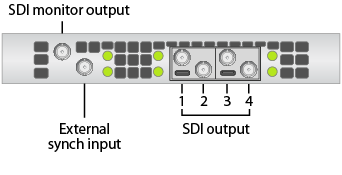 This allows you to select one of the following options:
- Free running: uses an internally generated reference clock.
- External sync: synchronize the unit to either a reference 10MHz studio reference clock so that the output video (either in UHD, HD or SD) aligns with the studio feed.
- Input transport stream: Synchronize the decode service to the PCR contained in the incoming transport stream, so that the output contains no dropped or repeated pictures.
- Remote production: Synchronize all decoded services to the PCR contained in one of the incoming transport streams, so that the output contains no dropped or repeated pictures, and all decode services are not only clock locked but also the start of each picture is also aligned. For further information see the Remote production application guide for how to set up an end to end system.
Configure the clock reference
To configure the clock reference, follow these steps:
-
From the Home page, select the RECEIVER item from the required feed then click
 .
-
Select the Clock reference format required for the SDI output.
Possible options:- Free running
- External sync (External sync requires a specific cable installation, see Installation Guide).
- Input transport stream
- Remote production
Configure the external sync offset
The RX1 has been set to External sync with a valid reference studio clock applied to the Sync input. The playout timing of each SDI output frame can be adjusted (advanced or delayed) in single pixel increments relative to the external frame sync.
-
From the Home page, select the RECEIVER item from the required feed then click
. -
From the Parameters section, select to Output tab.
-
Enter the offset required in pixels to be applied in the External sync offset field.