
This example creates an over-the-top (OTT) service with five video profiles and two stereo audio tracks. The output is a manifest and one transport stream (TS) file per video layer for MediaKind Packager. A new service can run with its default settings.
Video profiles
| Target bitrate (kbps) | Frame rate (fps) | Resolution | Codec | Expected quality |
|---|---|---|---|---|
| 20000 | 60 | 3840x2160 | HEVC 10 bit | Best |
| 8600 | 60 | 1920x1080 | HEVC 10 bit | Best |
| 4000 | 60 | 1080x720 | HEVC 10 bit | Good |
| 2200 | 30 | 960x540 | HEVC 10 bit | Satisfactory |
| 500 | 15 | 480x270 | HEVC 10 bit | Satisfactory |
For each of the two stereo audio tracks, use HE-AAC at 48 kbps with a 44.1 kHz sampling rate.
Configure and start the service
-
Go to Services > Add service > On-Demand Encoding. A new service has one audio and one video stream.
-
Enter a service name.
-
In Input Stream Selection, select Add audio..., configure the audio processing parameters, and select Apply. Check that the list shows one video and two audio streams.
-
Open Encoding and select Add video... to add four video streams. Use
 to configure each of the five encodings with the video profiles above. Select Apply for each.
-
In Encoding, select Add audio.... Configure and apply the audio settings, then add and configure the second encoding. Check that you have five video encodings and two audio encodings.
-
Open Output and enter the base publishing point. Select
on output_x to edit the output. -
Select
on output_x_x.ts. In Stream selection, select one video stream and the audio streams, configure their packet identifiers (PIDs), and select Apply. You can set the PID only for a selected stream.
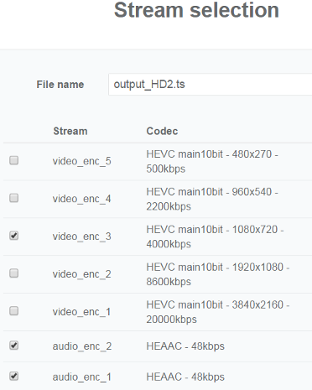
-
Select Add TS file and repeat the stream selection for each remaining video layer.
-
Select Save and exit. Check that the service appears in the services list.
-
Select
 to start the service.
-
Select its name to open Jobs and add a job. Service names appear as links when service-specific information is available. The page that opens depends on the processing type.
A newly added job starts on the running service. Its TS files appear in the configured output folder. Jobs with equal priority start in creation order.