
Use the Packager to deliver live streams and on-demand assets from a catalog.
High-level architecture
The Controller manages the configuration database, web interface, and API. It can share a unit with the Packager in a standalone or compact deployment, or run on a separate unit in a distributed deployment. The embedded origin packages and encrypts content on request. The publisher can push content to an external server.
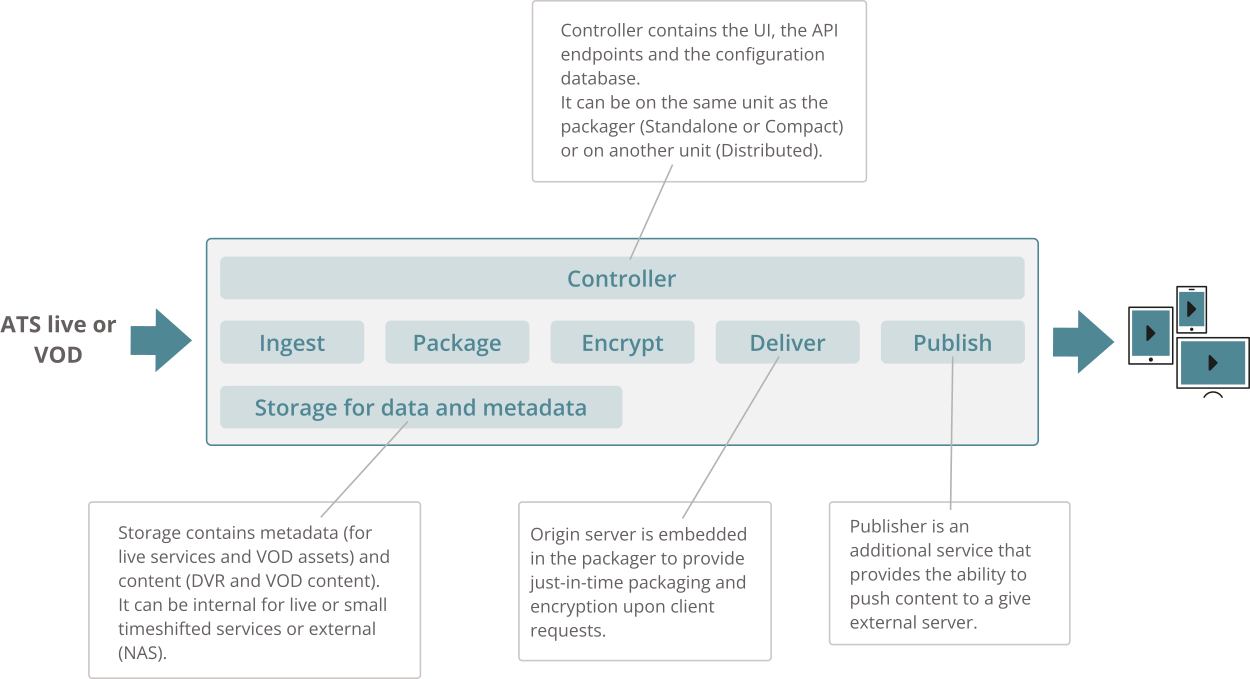
Definitions
Catalog: The catalog is the link between the outputs and the assets. It must be created first to host the outputs and be filled with assets. All assets added to the catalog can be delivered by any outputs from the catalog.
Output: An output is a set of specific delivery parameters for a defined input stream. It contains the processing and encryption parameters. It is added to the catalog to serve the content to the users. It can deliver all the assets existing in the catalog.
Asset: An asset is either live or on-demand content.
Live Packaging service: Configuration of the live input parameters. Once associated with a catalog, the service will be available for delivery using the outputs existing in the catalog.
On-Demand Packaging service: Associated to the catalog, it allows visualization of the existing assets. All assets listed can be delivered using the outputs existing in the catalog.
Configuration steps
This diagram shows a typical configuration workflow:

- Create a catalog to host the outputs and add assets.
- Add an output to deliver the assets from the catalog repository.
- Create an On-Demand Packaging service or a Live Packaging service.
- Associate it to the catalog to deliver the assets.
The delivery is done from the origin server. The output and asset used depends on the user request.
The delivery URL is a concatenation of the output access URL and the asset access URL.
Packaging workflows
- Manage catalogs and outputs
- Configure HLS or DASH over CMAF outputs
- Configure HLS over TS outputs
- Configure HSS outputs
- Add a thumbnail stream
- Configure Live Packaging services
- Configure On-Demand Packaging services
- Packager use cases
- Monitor packaging services
- Configure storage credentials and origin certificates
- Configuration parameters