
Use Stream Personalization as a manifest proxy to insert ads into an HTTP Live Streaming (HLS) service. When it detects an in-band SCTE-35 trigger for an ad break, Stream Personalization requests a placement decision from the ad decision server.
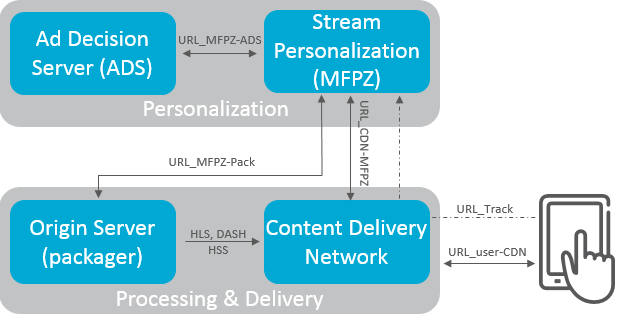
The arrows in the diagram correspond to these requests. MFPZ identifies Stream Personalization.
| Name | Description | Value |
|---|---|---|
| URL_user-CDN | Sent by a viewer to consume a live or non-linear content. | http://[CDN_host]/live/myChannel/index.m3u8?userid=1234&device=iphone |
| URL_CDN-MFPZ | This is URL_user-CDN, routed by the CDN to MFPZ. CDN is indeed configured with a no-cache policy for manifest files. | http://[MFPZ_host]/live/myChannel/index.m3u8?userid=1234&device=iphone |
| URL_MFPZ-PACK | Retrieves the original manifest from the packager, which is then modified by MFPZ based on the ADS response. | http://[packager_host]/hls/myChannel/index.m3u8 |
| URL_MFPZ-ADS | Upon ad break detection, MFPZ connects to the ADS, providing the list of ads to insert in place of the original ads. | http://[ADS_host]/[path]?userid=1234&device=iphone&breakDuration=30 |
| URL_Track | Tracking URL sent by the user player to MFPZ for ad viewing completing monitoring. | http://[MFPZ_host]/track/[quartile_event] |