
Video and Audio Encoding
A live encoder compresses uncompressed baseband video and audio into a lower-bitrate encoded format suitable for contribution, broadcast distribution, or streaming. MK.IO Beam’s Live Encoding converts live video feeds into streams for internet, IP, and broadcast delivery. You configure encoding settings, output profiles, and delivery targets through the MK.IO Beam interface, without managing the underlying processing pipeline.
The diagram below shows the functional blocks from input to output:
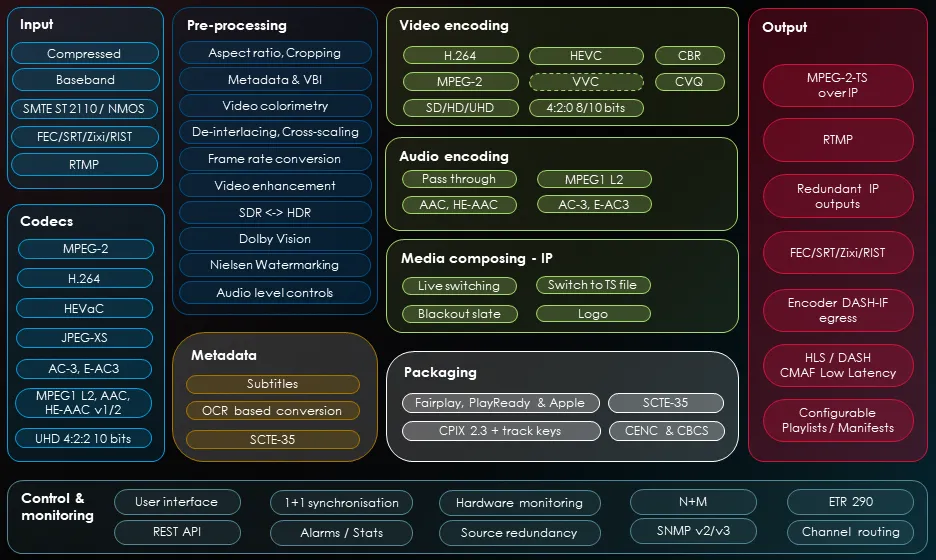 Live Encoder: functional view
Processing stages
Section titled “Processing stages”Input: The encoder receives and ingests the video signal. Several input types are supported, including SDI for HD and UHD workflows and IP transport streams.
Decoding: The input can be optionally decoded using a range of audio and video codecs before processing.
Pre-processing: After decoding, a range of pre-processing functions can be applied to improve signal quality or adapt the video before encoding.
Video and audio encoding: The video and audio are encoded. Audio pass-through is also supported, meaning audio can be forwarded without re-encoding.
Media composing: A specific input mode for content operations. You can schedule, start, and stop blackout, logo insertion, crawler insertion, switching to an alternate live input, or switching to a TS playlist.
Post-processing: After encoding, additional post-processing features are available, including SCTE-35 and SCTE-104 signalling for content replacement and advertising.
Output: The encoder produces an MPEG-2 Transport Stream over IP, in either CBR or adaptive bitrate modes. FEC (Forward Error Correction) and redundant IP outputs are also supported.
Rate control and statistical multiplexing
Section titled “Rate control and statistical multiplexing”MK.IO Beam’s Live Encoder uses a leaky bucket rate control model, which defines the constraints on bitrate variation that a decoder can handle. See Leaky bucket concept for an explanation of how this works.
For headend workflows, Live Encoder services can participate in statistical multiplexing (statmux) as slave services under a Multiplexer master. The Multiplexer dynamically adjusts each encoder’s bitrate allocation based on scene complexity across the pool, improving overall quality within a fixed output bandwidth. See Advanced rate control for details.
Common use cases
Section titled “Common use cases”- Contribution encoding: compressing live video for transport from a field location to a production facility.
- Headend encoding: producing compressed channels for multiplexing and distribution over cable, IPTV, or satellite.
- OTT encoding: producing streams for adaptive bitrate packaging and delivery.
To create your first Live Encoding service, see Create a Live Encoding service.