
MK.IO Beam for headends, high availability controller, distributed workers
Live Broadcast use case
The target of the Live Broadcast use case is to encode or transcode a set of incoming sources and multiplex them with optional encryption into an MPTS for distribution to end-users via traditional broadcast networks using digital terrestrial, satellite, or cable transmission.
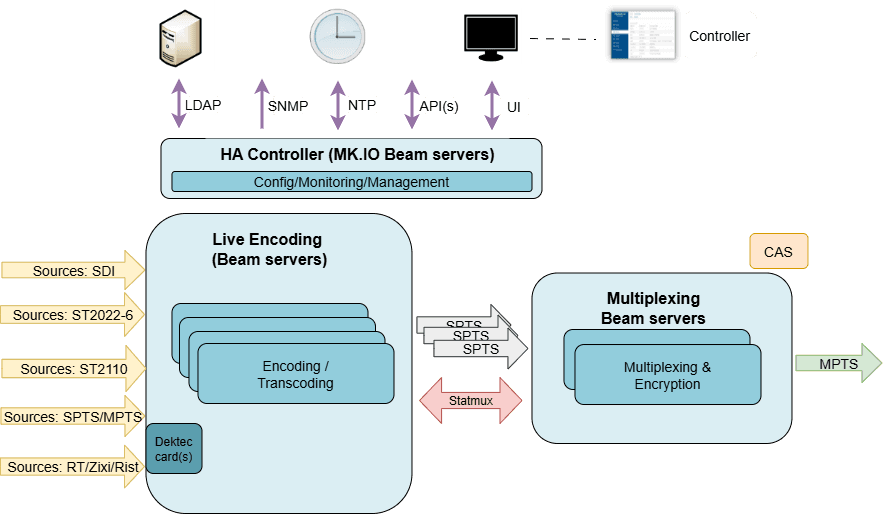
In this configuration, Live Encoding receives the incoming sources, encodes or transcodes them into SPTS streams, and sends them to Multiplexing. Multiplexing receives the encoded streams and combines them to produce a DVB-compliant MPTS stream.
Live Streaming use case
The target of the Live Streaming use case is to encode or transcode a set of incoming sources and Package them in different ABR formats including HLS DASH and HSS.
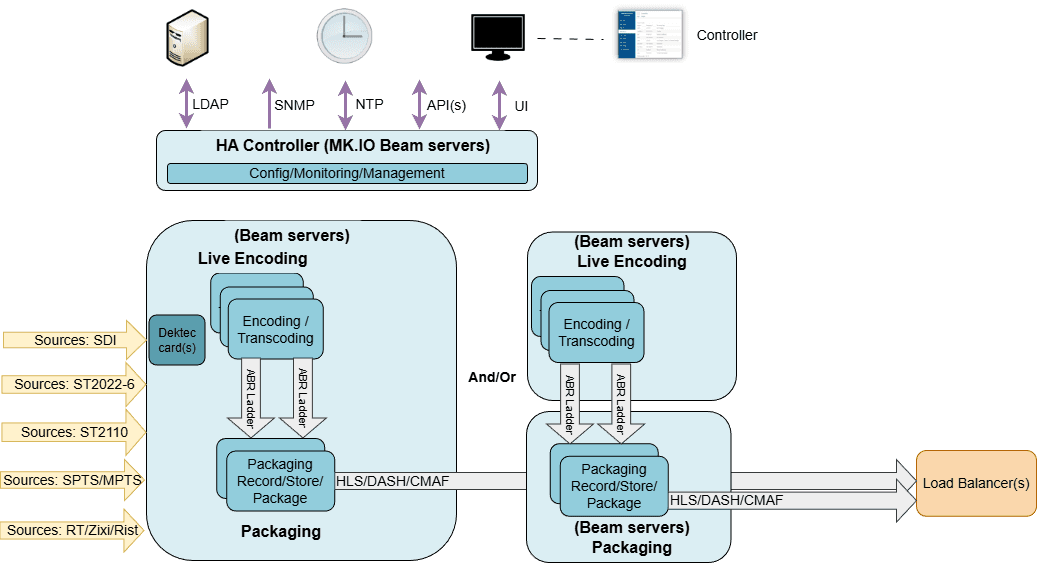
In this configuration, Live Encoding receives the incoming sources, encodes or transcodes them into SPTS streams, these streams are Packaged into segments and manifests so that players can stream them adaptively over HTTP.
Live Encoding and Packaging Services may be deployed to the same distributed server nodes, or separate server nodes with the choice dependent on the server node capacity.
Live Stream Processing use case
The target of the Live Streaming use case is to encode or transcode a set of incoming sources and dynamically substitute content in response to Time (POIS) or Signal (SCTE-35) based triggers.
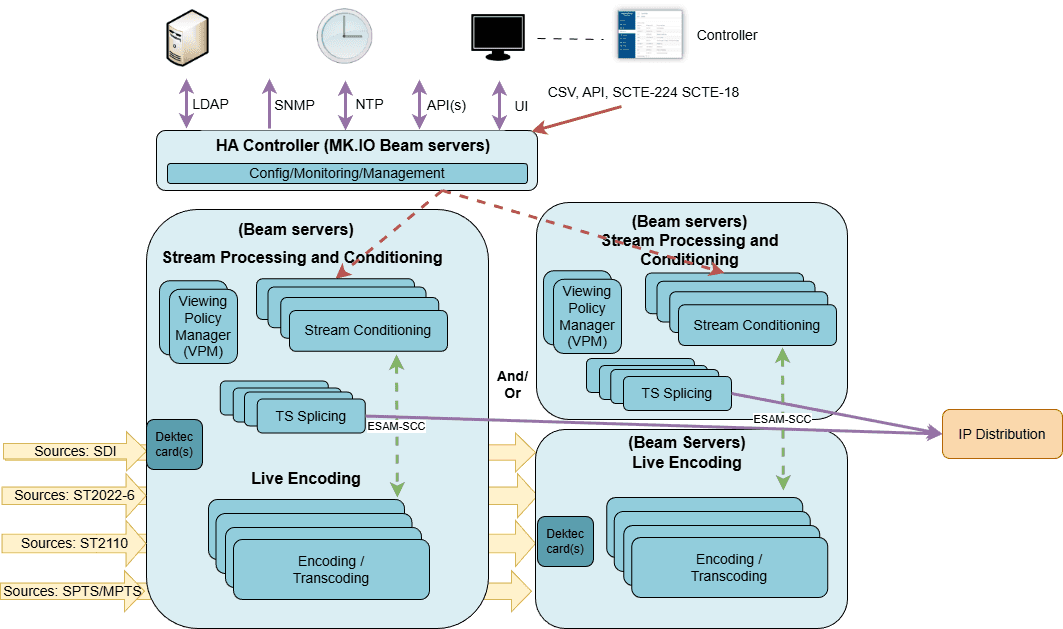
In this configuration, Live Encoding receives the incoming sources, encodes or transcodes them into SPTS streams. Live Stream Processing dynamically substitutes content within a live MPEG-2 Transport Stream without decoding and re-encoding the video content from one source with content from another in response to SCTE-35 trigger signals or a schedule.
Live Encoding, Viewing Policy Manager (VPM) Stream Conditioning (SC) and TS Splicer Services may be deployed to the same distributed server nodes, or separate server nodes with the choice dependent on the server node capacity.
Redundancy
N+M redundancy
N+M redundancy is supported, where N is a collection of servers dedicated to active services and M is a smaller collection of servers that may be used for carrying some active services if some of the dedicated servers, or their dedicated sources, fail.
Using Controller Failover groups for n+m redundancy
MK Controller n+m redundancy is provided through "Failover Groups", this is accessible via the Controller Failover menu. Failover groups provide server or service level redundancy for Live Encoding, Packaging, Viewing Policy Manager, Stream Conditioning and TS Splicer services.
From the Failover page: On adding a group, or editing an existing group the user is presented with options to specify a group with
- Group name - a name which represents the purpose of the failover group.
- Failover level:
- Server - failover all services to a backup server, for a failover operation.
- Service - failover just the affected services, to a backup server, for a failover operation.
- Group Processing Type - The service types that are affected by a failover group, for the case when a worker Server hosts multiple service types.
- Group failover mode:
- Automatic - failover will be triggered on critical alarm.
- Manual - failover is only triggered by user action.
- Available servers - The collection of servers that may be used for Primary or Backup operation.
- Primary Servers - The collection of servers which are dedicated as Primary servers for a failover group. These servers are those which are expected to be normally active and may not be used as a failover target server.
- Backup Servers - The collection of servers which are dedicated as Backup servers for a failover group. These servers are expected to be normally inactive and available for uses solely as backup server(s).
-
The backup server(s) need(s) to be compatible with the services being used for failover, including network interface naming.
-
Following a failover operation, the “now” in-use backup server may not be used for any further failover operations. Clearing the fault condition on the origin server and then reverting the failed services back to the origin server will allow the backup server to be used for failovers from other servers.
-
Manual failover and revert, for an existing group, is exercised through the "Detail" Failover Actions icon.
-
Some Group Processing Type options include "(Dual Output)". This option is to be used with Live Encoding and TS Splicer Services, that have been configured for "Dual Output Prevention". The option's purpose is to reduce/avoid outage seen with failover operations, by starting the Service on the Backup server ahead of stopping it on Primary Server. (On confirming the service has started on the backup, a period of 3s will be waited for stabilisation, prior to stopping the service on the Primary server.)
-
Failover group processing type handling operates on a subset of processing types - any services of the type listed in the chosen "Group processing type" selection will be moved from nominated Primary to backup server(s). If chosen Group processing type list, has processing types which are not in use, these will be ignored during failover and reversion operations.
1+1 Redundancy
1+1 redundancy is supported, where two servers are used to host/carry the same active service(s).
1+1 Multiplexer service Active Active operation
This mode is the default output handling for when two servers are assigned to the same Multiplexer service.
When operating in this mode, the service will be transmitting/outputting on both Servers, it will be the responsibility of the downstream recipient to determine which server's Multiplexer output to use. It is recommended that multiple Outputs are defined, and the "Server filter" field is used to ensure that the outputs are unique for each server.
*If using this mode of operation, consider disabling automatic Multiplexer server failover handling. This maintenance operation is detailed in the MediaKind High Availability Distributed MOP document, and should only be configured by a qualified person.
1+1 Multiplexer service Active Standby operation
This handling is enabled by selecting "IP Active/Standby" and/or "ASI Active/Standby" in the Multiplexer service configuration.
When enabled and the service is started, both servers will carry the services in an active state, but they are not both actively outputting/transmitting over the configured IP or ASI output. One server is active and outputting/transmitting and the service on the other server will be in an active and synchronised, but standby state.
On failure of the actively outputting/transmitting server, the service in standby mode on the other server will take over.
1+1 Live Encoding and TS Splicer dual output prevention operation
MediaKind Live Encoding and TS Splicer services may be configured in such a way that multiple servers are assigned to the same service but only one Server will be actively outputting/transmitting.
This feature is enabled by selecting "Dual Output prevention" in the Live Encoding and TS Splicer services General tab and then detailing parameters for the communication between the servers assigned for the same service.
When enabled and the service is started, both servers will carry the services in an active state, but only a single server will be outputting/transmitting.
This setting may be used in conjunction with the "Dual Output" Failover group processing type options, to allow the service to be started on the backup server, ahead of stopping it on the Primary server. The effect being to reduce outages during failover operations.
Packager redundancy considerations
In addition to standard Packager service configuration, ensure that the Live Encoding Output(s) include Publishing points for all Backup and 1+1 partner servers, as well as the Primary Server.