
BISS decryption modes
BISS refers to either BISS1 or BISS2, both of which, from a receiver perspective, use a fixed Control/Session Word to decrypt scrambled content, except in the case of BISS‑CA. The supported modes are listed in the table below and are defined in EBU Tech 3292. These modes are supported by MK.IO Beam Distribution.
| BISS Protocol Version | Supported Modes | Scrambling Algorithm | Key Length |
|---|---|---|---|
| BISS1 | Mode 1 Mode E | DVB-CSA | 48 bits |
| BISS2 | Mode 1 Mode E Mode CA (BISS-CA) | DVB-CISSA | 128 bits |
For details on BISS-CA, refer to the BISS-CA Decryption section
BISS Mode 1
BISS mode 1 (BISS1-1 or BISS2-1) is recommended for short‑term events, such as sports broadcasts. Mode 1 uses a fixed key called the Session Word for encryption and decryption.
The session word, referred to as the Clear Session Word (CSW), is entered into the receiver via the web interface. If the same CSW is also configured on a BISS‑compliant encoder, the receiver successfully decrypts the encrypted service.
Set BISS to mode 1
Beam automatically switches between the BISS1 or BISS2 version based on the BISS Key length entered in the configuration.
To set BISS to mode 1, follow these steps:
-
From the Home page, select the RECEIVER item from the required feed then click to edit
-
Select the Decrypt tab in the Parameters window.
-
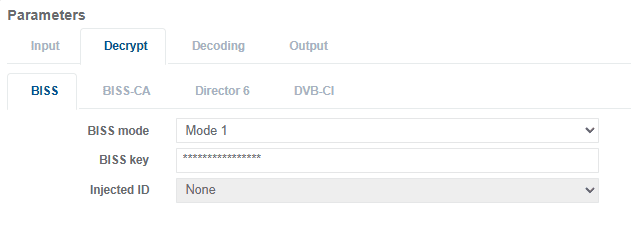
Select Mode 1 for BISS mode.
-
Update the BISS Key with the 12-digit hexadecimal CSW for BISS1 or the 32-digit hexadecimal CSW for BISS2. The CSW digits will remain visible whilst being entered but once clicked away, the BISS key will be obscured with ************.
Example:
-
Click Save and Continue
The service configured for decode should now be decrypted and successfully decoding. If the BISS key is incorrectly entered or the service is encrypted using a different CA scheme then erroneous packets will be output from the descrambler and the decoder will fail to decode the service.
BISS Mode E
In BISS Mode E (BISS1-E or BISS2-E), the Clear Session Word (CSW) is encrypted to form the Encrypted Session Word (ESW). Because the ESW is used as the BISS key input, Beam requires an Injected ID to derive the CSW.
Ideally, the BISS Injected ID is securely embedded on the device by the Content Provider and is not shared. If both the ESW (BISS key) and the Injected ID are known, BISS Mode E offers no additional security over BISS Mode 1.
Set BISS Injected ID
The BISS Injected ID is required for BISS Mode E and should be configured or made available by the Content Provider.
-
Select Appliance from the left-hand side menu.
-
Click the BISS Injected IDs tab.
-
In the New Injected ID field, enter the 14-digit Injected ID provided for BISS1 or the 32-digit Injected ID provided for BISS2.
-
In the Description field, enter a unique description that allows the Injected ID to be referenced later on.
-
Click Upload.
The new Injected ID is added to the list of Injected IDs embedded on the device. Multiple Injected IDs can be entered using the same process. Each Injected ID must have a unique description, as this description is used to select the correct Injected ID when configuring BISS Mode E.
Set BISS to mode E
Beam automatically switches between the BISS1 or BISS2 version based on the BISS Key length entered in the configuration.
To set BISS to mode E, follow these steps:
-
From the Home page, select the RECEIVER item from the required feed then click to edit
-
Select the Decrypt tab in the Parameters window.
-
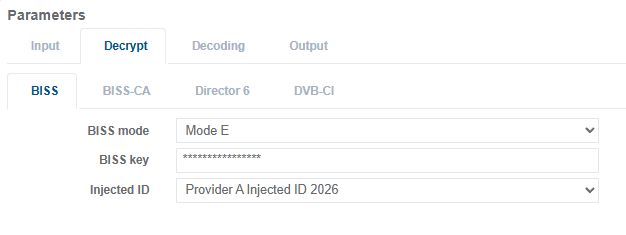
Select Mode E for BISS mode.
-
Update the BISS Key with the 16-digit hexadecimal ESW for BISS1 or the 32-digit hexadecimal ESW for BISS2. The ESW digits will remain visible whilst being entered but once clicked away, the BISS key will be obscured with ************.
Example:
-
From the Injected ID drop down option list, select the appropriate description name to the required Injected ID embedded in the Beam device.
-
Click Save and Continue
The service configured for decoding should now be decrypted and decoding successfully. If the BISS key is entered incorrectly, an incorrect Injected ID is used, or the service is encrypted using a different CA scheme, the descrambler will output erroneous packets and the decoder will fail to decode the service.