
Director 6
Director 6 delivers secure, end‑to‑end management for contribution and distribution networks, with enhanced content security beyond Director 5 (not supported in Beam).
Director Features
Conditional Access (CA)
A Trusted Platform Module (TPM) must be fitted. If not fitted, the Director 6 functionality will be hidden. Please contact MediaKind Customer Support on how to check this.
The SD/HD and UHD service Configuration Types can decrypt and decode a single service. For multiple service decryption from a single transport stream, use the TS Passthrough service Configuration Type.
Supplying Information to the Director Headend
Receivers under the control of a Director 6 headend system must be registered by supplying the Director Key File downloaded from the unit. This contains all the information necessary for the Director 6 headend to authorize decrypting scrambled content or accepting Over-Air-Control (OAC) commands.
Before you start, ensure at least one service is configured.
-
From the Home page, select the RECEIVER item from the required feed then click to edit
-
From the Parameters window, select the Decrypt tab.
-
Click the Director 6 tab.
-
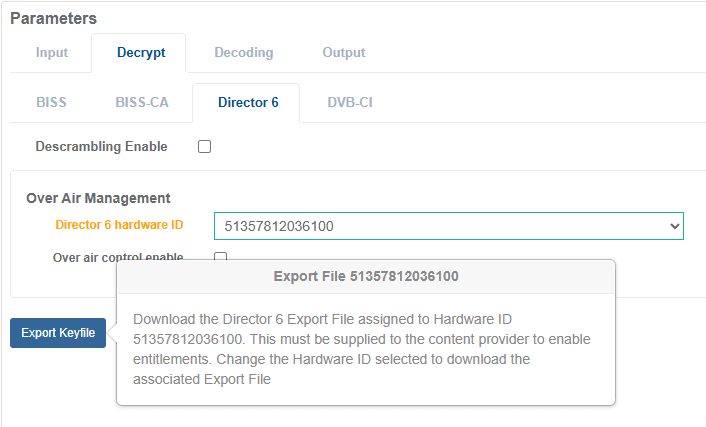
From the Director 6 hardware ID drop down list, select an ID entry that the content provider can use to address the receiver service.
-
Click Export Keyfile button to download the Director Key File.
-
If other Director 6 hardware IDs are assigned to other receiver services, repeat the above steps to export and download the Director Key File for each unique Director 6 hardware ID assignment.
-
Send the Director Key File(s) to the content provider who will manage entitlements.
Configuring Director 6 Decryption
Enable Director 6 Decryption for Service Decode
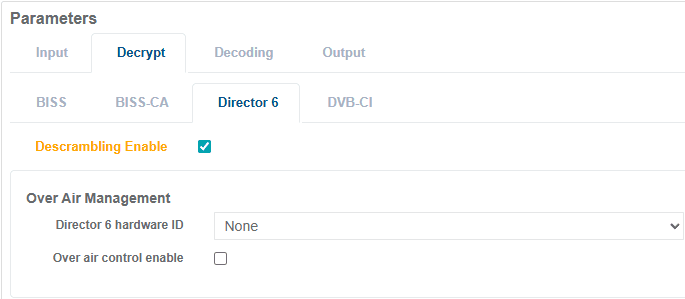
Director 6 decryption is enabled by ticking the Descrambling Enable check box in the receiver service configuration. This allows multiple service configurations to decrypt using Director 6 without being limited to the Director 6 hardware ID.
For a receiver service that has been configured for UHD or SD/HD, enable Director 6 decryption with the following steps.
-
From the Home page, select the RECEIVER item from the required feed then click to edit
-
From the Parameters window, select the Decrypt tab.
-
Click the Director 6 tab.
-
Tick the Descrambling Enable check box.
-
Once configuration is complete, click Save and Continue to apply change.
Enable Director 6 Decryption for TS Passthrough
For a receiver service that has been configured for TS Passthrough, enable Director 6 decryption with the following steps.
-
From the Home page, select the RECEIVER item from the required feed then click to edit
-
From the Parameters window, select the Decrypt tab.
-
Click the Director 6 tab.
-
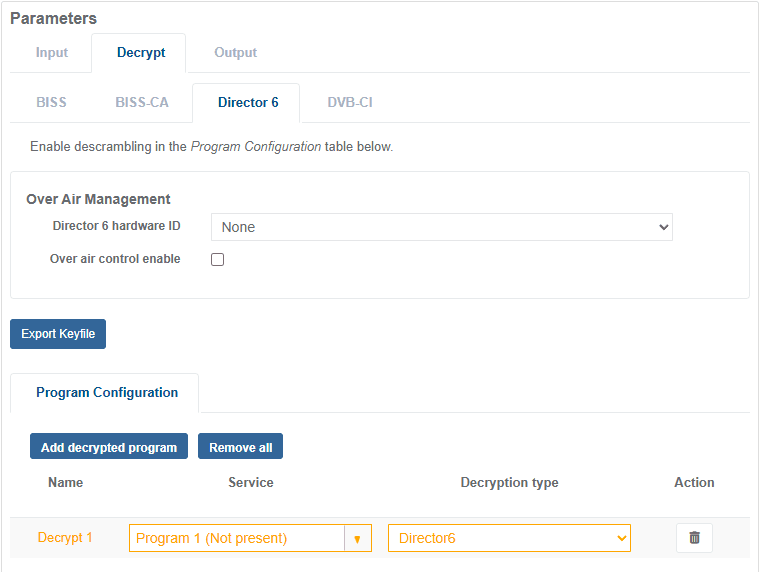
Under the Program Configuration section, click the Add Decrypted Program button.
-
A new row will appear in the decryption table, set the Service to be decrypted and set the Decryption Type to Director 6.
-
Once configuration is complete, click Save and Continue to apply change.