Receiver Input Redundancy
For each Receiver service configuration, the default input is designated as the Primary input. If the this input fails, the service will stop descrambling and/or decoding.
It is possible to configure input redundancy for the Receiver service by choosing a Redundancy Mode and defining a Secondary (backup) input.
Redundancy Mode Options
| Redundancy Mode | Key Behaviour | Speed | Auto Switching |
|---|---|---|---|
| Off | Primary only | — | None |
| Active Passive (one-hit) | One-time failover, Primary active and Secondary on demand | Slow | One-hit |
| Active Active (one-hit) | One-time failover, Primary and Secondary both active | Fast | One-hit |
| Active Active (switch on failure) | Continuous failover between Primary and Secondary active inputs | Fast | Ongoing |
| SMPTE ST 2022-7 | Seamless Protection Switching between two IP data paths. | Fast | Ongoing |
Off
The service only uses the Primary input. It is not possible to automatically or manually use the Secondary input.
Active passive (one-hit)
If the Primary input fails then the Receiver service will make a one-hit switch to the Secondary input.
The Secondary input is only started on demand so the switch occurs without verifying whether the Secondary input has a valid source that can be locked to.
Once the service switches to the Secondary input, it will not automatically revert to the Primary input. Manual intervention is required. The user can manually switch between inputs at any time.
Active active (one-hit)
If the Primary input fails then the Receiver service will make a one-hit switch to the Secondary input.
The Secondary input is always active so will result in quicker switching. However, the switch still occurs without verifying whether the Secondary input has a valid source that can be locked to.
Once the service switches to the Secondary input, it will not automatically revert to the Primary input. Manual intervention is required. The user can manually switch between inputs at any time.
Active active (switch on failure)
If the current input (Primary or Secondary) fails, the Receiver service switches to the alternate input.
Both Primary and Secondary inputs are always active so switching between them is fast. The service switches on failure regardless of whether the alternate input has a valid lock. If neither input is valid, the service continuously switches between them until a valid lock is detected.
The user can manually switch between inputs at any time.
SMTPE ST 2022-7
SMPTE ST 2022-7 Seamless Protection Switching is only available when both Primary and Secondary inputs are configured as IP inputs. It requires two identical RTP transport streams to be carried independently over separate network paths for redundancy.
Both streams are received simultaneously and synchronised within the receiver, allowing packet loss on either path to be mitigated using packets from the other.
Receiver Input Redundancy Configuration
Any of the Input Types supported by the Receiver service can used as the Primary or Secondary input when enabling any of the Input Redundancy modes.
Configure a Receiver service for Input Redundancy mode
Before you start, ensure at least one Receiver service is configured.
-
From the Home page, select the RECEIVER item from the required feed then click to edit.
-
Select the Input tab under the Parameters section.
-
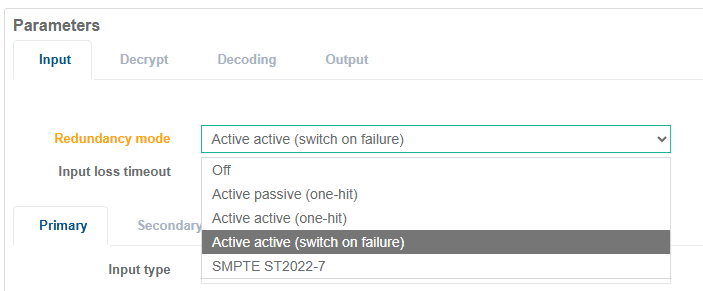
Select the desired Redundancy mode option.
-
Set the Input loss timeout to the delay (in milliseconds) between detecting an input error and switching to the alternate input.
If the input error is cleared before the end of the Input loss timeout, the redundancy switch is aborted and the service will continue to use the current input.
-
If SMPTE ST2022-7 is selected as the Redundancy mode, the Max skew parameter specifies the maximum permitted timing difference (in milliseconds) between two IP data streams. If the measured skew exceeds this value, packets may be lost during seamless protection switching.
-
Select the Primary tab and configure the input as decribed in the Transport Stream Input Configuration section.
-
Select the Secondary tab and configure the input as decribed in the Transport Stream Input Configuration section.
-
Once complete, click Save and exit.
A 20 second delay occurs from the moment you save in order to initialize the redundancy configuration. Any loss of input or alarms raised on the Primary input during this time does not cause a switch.
Manually Switch Between Primary and Secondary inputs
Manual switching between Primary and Secondary inputs is possible even when both inputs are healthy. This is not supported for SMPTE ST 2022-7.
Before you start, ensure at least one Receiver service is configured with a Redundancy mode selected.
-
From the Home page, select the RECEIVER item from the required feed then click to edit (or click to view the Statistics page).
-
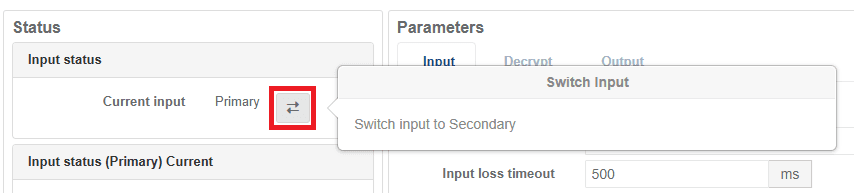
Locate the Input Status section of the page and click the Switch Input icon .