
Media resource model
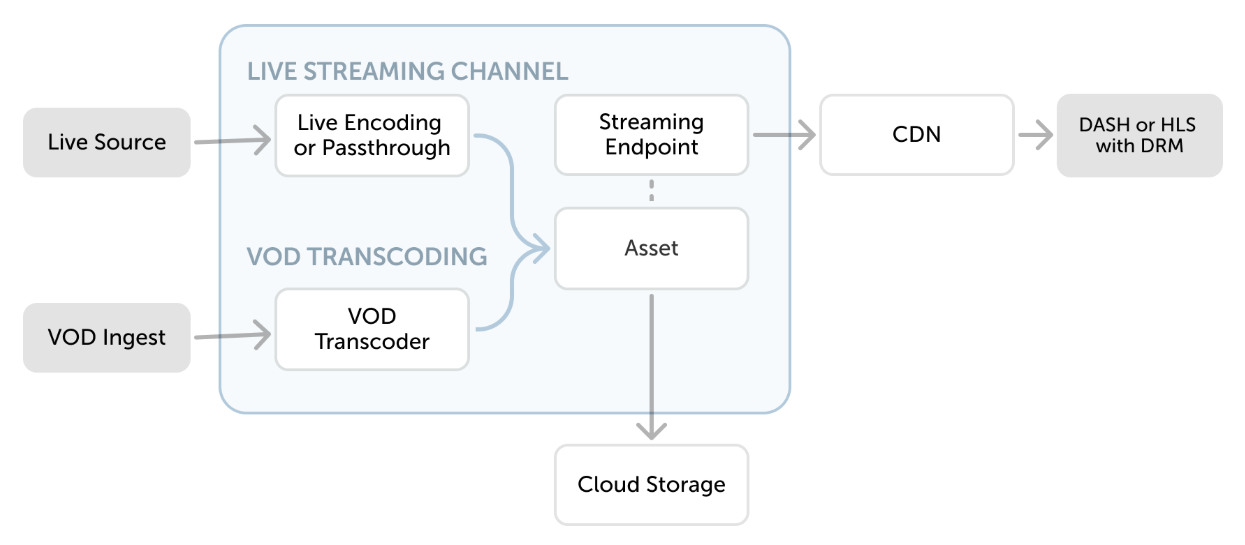
MK.IO workflows combine resources for storage, processing, and delivery. The resources you use depend on whether the input is an on-demand file or a continuous live stream.
Organize media
Section titled “Organize media”An asset is a logical reference to files in connected cloud storage. Processing jobs and live outputs use assets as inputs or destinations. Streaming locators also reference assets when publishing content.
Connect storage before you add or create assets. See Connect cloud storage and Assets and storage.
Process on-demand media
Section titled “Process on-demand media”A transform defines a reusable processing task for file-based content. A job applies that transform to an input and writes the result to an output asset.
Use Video processing for portal instructions. Use the Transforms and jobs API Guide to automate the same workflow.
Process live media
Section titled “Process live media”A live event receives a continuous input for passthrough or encoding. A live output writes the processed stream to an asset and maintains the archive window used for playback.
Use Live events for portal instructions. Use the Live streaming API Guide for API workflows.
Publish media
Section titled “Publish media”A streaming locator associates an asset with a streaming policy and provides the path used for playback. A streaming endpoint packages and delivers the content through HLS or DASH.
Use Streaming endpoints and playback to publish content in the portal. The Publishing API Guide covers the corresponding API resources.
Protect playback
Section titled “Protect playback”A content key policy defines how MK.IO issues content keys and authorizes protected playback. A streaming policy can refer to that content key policy when you create a locator.
Use Content key policies for configuration guides. Use the Content protection API Guide for API-based workflows.