
Live events
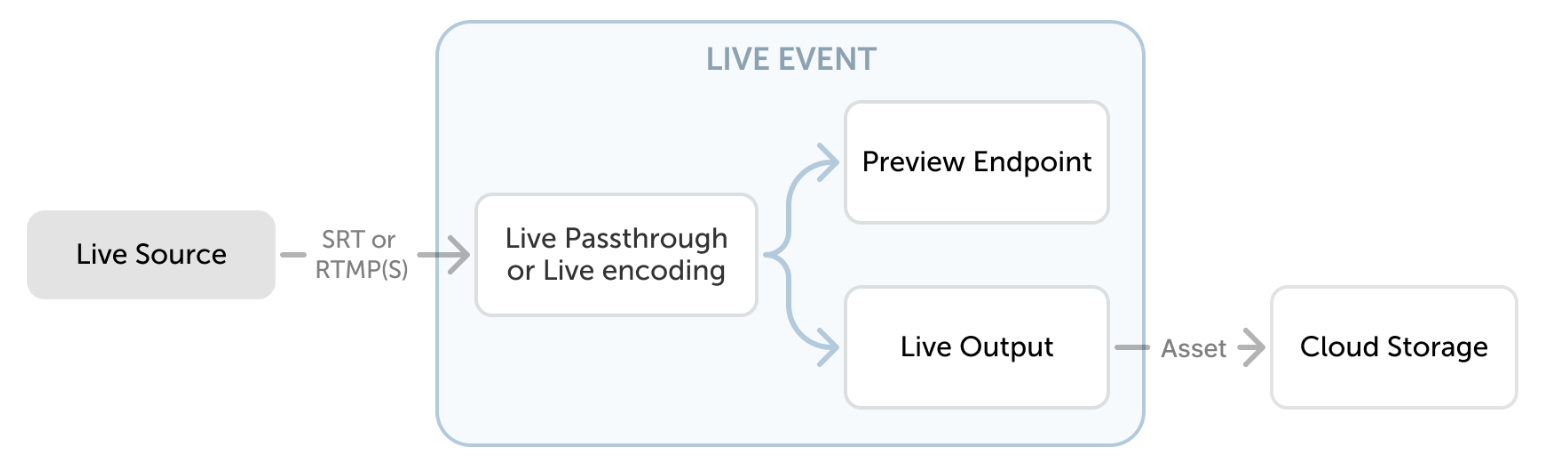
Live events receive content that is streamed continuously with Real-Time Messaging Protocol (RTMP), encrypted RTMP (RTMPS), or Secure Reliable Transport (SRT). Choose passthrough when the source is already prepared for delivery, or live encoding when MK.IO should create adaptive bitrate (ABR) output.
Live Encoding
Section titled “Live Encoding”For live content, a Live Event creates an endpoint for input, an endpoint for preview, and an encoder. Live Events provide a persistent DNS name through which content can be streamed for encoding. The DNS name remains available while the service is alive, though its configuration is removed when a stream is stopped.
MK.IO provides two encoding presets:
- A standard version up to 720p at 30fps.
- An advanced version up to 1080p at 30fps.
Both versions support live-to-VOD workflows and archive windows of up to 7 days. For archive windows longer than 25 hours, the default manifest presents a rolling 25-hour window. See Extended archive window for access to earlier content.
A live event also has a streamOptions setting of Default or LowLatency, set at creation and not changeable afterward.
Preset Lineup Summary
Section titled “Preset Lineup Summary”| Built-in preset name | Video | Audio |
|---|---|---|
| Live Encoding 720p (Foundations) | 340x192 @ 30fps / 200kbps 384x216 @ 30fps / 550kbps 512x288 @30 fps / 850kbps 704x396 @ 30fps / 1350kbps 960x540 @ 30fps / 2200kbps 1280x720 @ 30fps / 3500kbps | 96 kbps / 48kHz |
| Live Encoding 1080p (Advanced) | 320x180 @ 30fps / 200kbps 480x270 @ 30fps / 400kbps 640x360 @ 30fps / 800kbps 960x540 @ 30fps / 1600kbps 1280x720 @ 30fps / 3000kbps 1920x1080 @ 30fps / 5500kbps | 96 kbps / 48kHz |
Live Passthrough
Section titled “Live Passthrough”Live Passthrough comes in two versions:
- Standard: Capped at 5 Mbps ingest.
- Advanced: Supports up to 60 Mbps ingest.
For Live passthrough, MK.IO supports RTMP and RTMPS transport protocols. Additionally, for Live encoding, it is possible to receive streams using the SRT protocol.
Live Outputs
Section titled “Live Outputs”In order for content to be presented in a playable rendition, a Live Output is required.
Live Outputs manage a timeshift buffer (or DVR) that persists to an asset in storage as the content is being streamed. A Live Event on its own will encode video but will not write that video to a permanent location. This is what Live Outputs achieve.
You can create multiple outputs for a live event. For example, you can use a 6-hour timeshift buffer for later review and a 3-minute buffer for live playback. You can add or remove live outputs through the portal or API, including while the event is running.
A Live Output writes to an Asset, but that Asset is not watchable on its own. To get a playback URL, create a Streaming Locator for the output Asset, and make sure a Streaming Endpoint is Running. VOD assets use the same relationship.
Live event state
Section titled “Live event state”A live event has a resourceState, set by the system:
| State | Meaning |
|---|---|
Stopped | The event exists but is not accepting input. |
Starting | The event is coming online. |
Running | The event is accepting input and encoding or passing it through. |
Stopping | The event is shutting down. |
Deleting | The event is being removed. |
A live event’s ingest endpoint only accepts a source stream while the event is Running.