
A streaming endpoint is a dynamic, or just-in-time, packaging and origin service. It formats and delivers live and on-demand content to compatible players through HTTP Live Streaming (HLS) or Dynamic Adaptive Streaming over HTTP (DASH).
The endpoint supplies the hostname used with streaming-locator paths. It can also apply dynamic encryption for supported Digital Rights Management (DRM) systems.
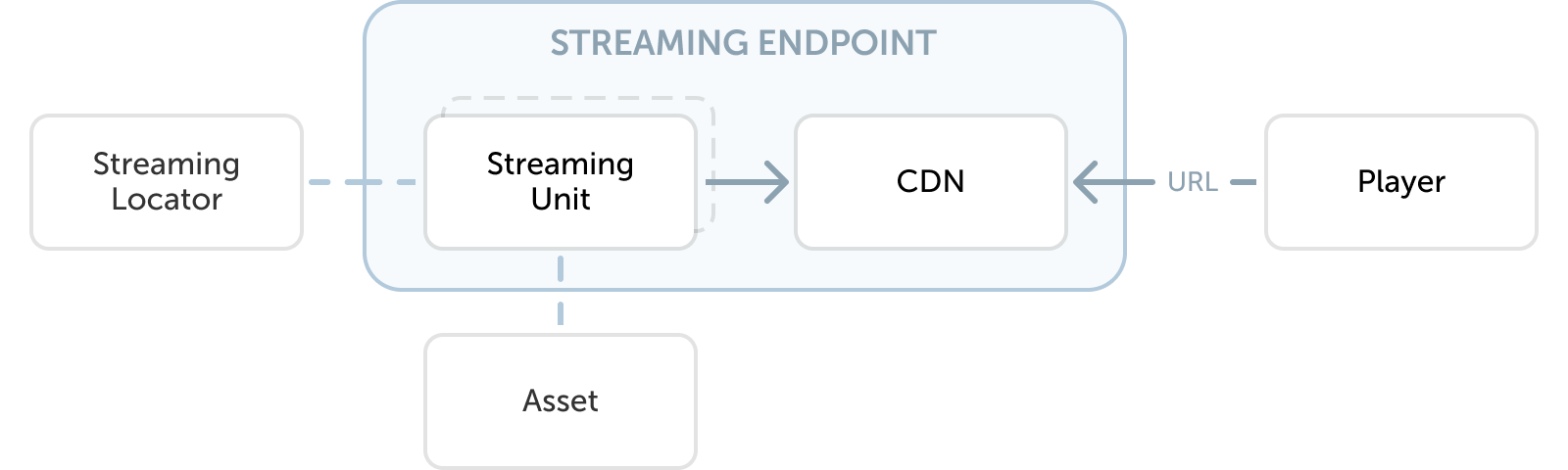
To start streaming videos, you need to start the Streaming endpoint from which you want to stream the video.
Streaming endpoint type
Choose one of three endpoint types:
- Shared: Access up to 600 Mbps as part of a shared infrastructure within your streaming region.
- Dedicated: Choose the number of Streaming Units for the number of dedicated 200 Mbps units.
- CDN: The best choice for production traffic. Using a CDN improves the user experience by caching the content and thus delivering it with a lower latency. CDN is backed by the dedicated streaming endpoint capacity.
Choose the type based on the required capacity, delivery model, and level of guarantee.
You can add and scale your endpoints based on the throughput of traffic that needs to be delivered. Scale is controlled through scaleUnits on the streaming endpoint resource: a value of 0 provisions a Standard SKU, and any value greater than 0 provisions Premium SKUs.
Endpoint state
A streaming endpoint has a resourceState, set by the system, that reflects what it is currently doing:
| State | Meaning |
|---|---|
Creating |
The endpoint is being provisioned. |
Starting |
The endpoint is coming online. |
Running |
The endpoint is serving traffic. |
Scaling |
The endpoint is changing capacity. |
Updating |
Configuration changes are being applied. |
Restarting |
The endpoint is restarting. |
Stopping |
The endpoint is shutting down. |
Stopped |
The endpoint exists but is not serving traffic. |
Deleting |
The endpoint is being removed. |
Deleted |
The endpoint no longer exists. |
A streaming locator cannot deliver content while its streaming endpoint is anywhere other than Running. This is the most common reason a correctly published asset returns errors instead of playing.
Hostname and access control
Each streaming endpoint gets an auto-generated fully qualified hostname. Custom hostnames are not currently supported.
By default, a streaming endpoint accepts requests from any IP address (0.0.0.0/0). You can restrict this with an IP allow list to limit which clients can reach the endpoint directly.
CDN behavior and constraints
An integrated Content Delivery Network (CDN) endpoint supports live and on-demand delivery with HTTP Live Streaming (HLS) using Common Media Application Format (CMAF), and Dynamic Adaptive Streaming over HTTP (DASH). You can also configure an external CDN to use a standard MK.IO streaming endpoint as its origin.
The CDN caches content separately for each representation, streaming protocol, and encryption or Digital Rights Management (DRM) configuration when common encryption is not used. A change that invalidates many cached objects at once, such as a broad account-filter change, can cause a temporary increase in traffic to the streaming endpoint.
CDN delivery reduces origin traffic, but the streaming endpoint still needs enough capacity to serve cache misses. Integrated CDN delivery uses dedicated endpoint capacity.