
Create a private network connection when an Azure Storage account must exchange data with MK.IO through a private link.
The Storage API Guide explains the storage resource and credential model used by the request below.
MK.IO already encrypts traffic to Azure Storage and authenticates with the storage account's Shared Access Signature (SAS) token. A private link adds network isolation by restricting storage traffic to an approved connection.
Before you configure the link
- Create a new MK.IO storage resource for the private connection where possible.
- Complete the MK.IO request and Azure approval as one change. MK.IO requests to the storage account time out and fail until both sides are configured.
- If you enable a private link on an existing storage resource, access to that storage account is interrupted until Azure approves the connection.
Before making the request, configure an Azure Storage account and collect its subscription ID, resource group name, and storage account name. The request creates the MK.IO storage resource and asks Azure to establish the private connection.
curl --request PUT \
     --url https://app.mk.io/api/v1/projects/{project_name}/media/storage/{storage_name} \
     --header 'accept: application/json' \
     --header 'authorization: Bearer {your token}' \
     --header 'content-type: application/json' \
     --data '
{
  "spec": {
    "credential": {
      "sasToken": "?sv=2022-11-02&ss=bfqt&srt=co&sp=rwdlacupiyx&se=2024-11-12T00:05:04Z&st=2024-11-11T16:05:04Z&spr=https&sig=<redacted>"
    },
    "privateLinkServiceConnection": {
      "requestMessage": "Request access message",
      "resourceGroupName": "storage_account_resource_group",
      "storageAccountName": "storage_account",
      "subscriptionId": "storage_account_subscription"
    },
    "type": "Microsoft.Storage",
    "description": "Input media files for processing.",
    "url": "https://{storage_account}.blob.core.windows.net/"
  }
}
Upon successful creation of the storage account, MK.IO will issue a request to the storage account and give the request message as the description of the connection request.
The request will remain pending until an explicit approval is done by the owner of the storage account in Azure. To list the pending connection requests, you will need to browse to the Networking configuration section of your storage account in Azure and open the Private endpoint connections tab as shown below:
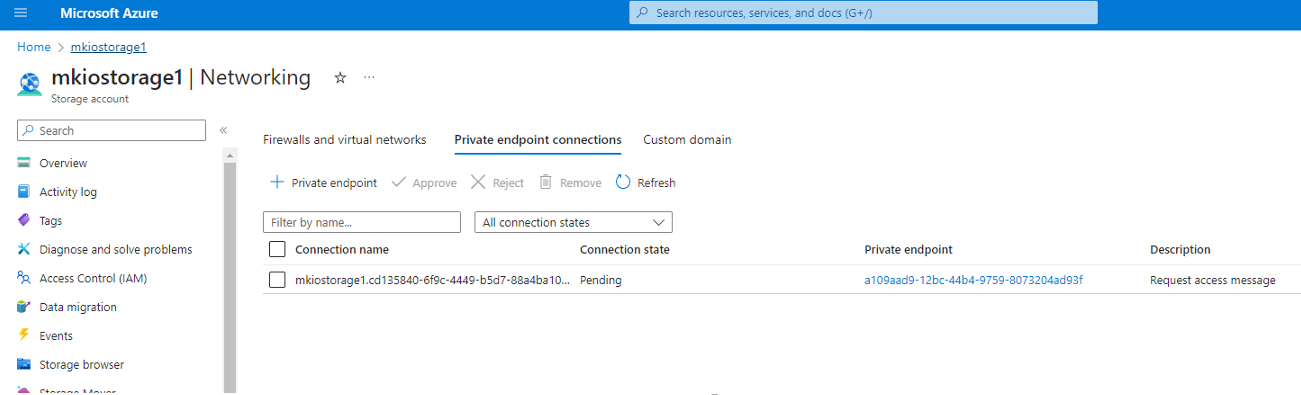
Select the connection you want approve and hit the Approve button. You can use the description message to validate that this is the request from MK.IO.
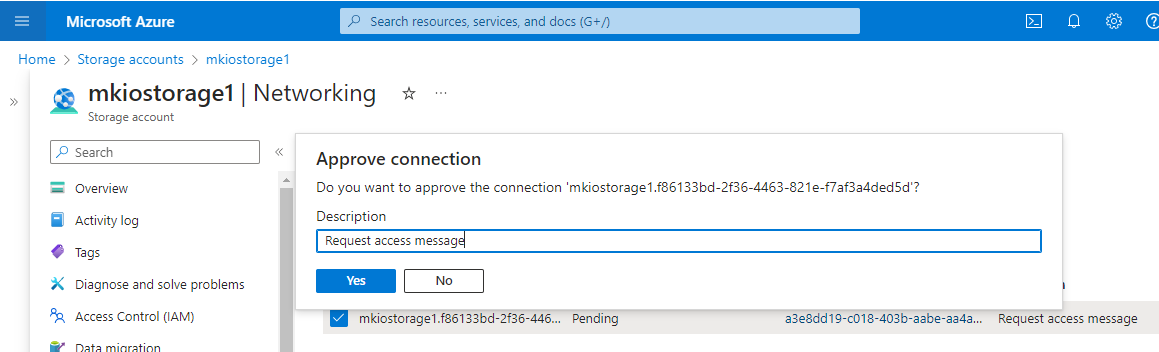
Validate the connection by clicking on Yes.
All traffic between MK.IO and the storage account now uses the private link. See MK.IO pricing for current private-link and storage-traffic rates.
Remove a private link
Update the storage resource and set privateLinkServiceConnection to null, then disable the private-link configuration in Azure. Rotate the SAS token during the same update and confirm asset access before treating the change as complete. See Storage API Guide for the update behavior.