
The Satellite Modulator option card is only supported on MK.IO Beam running on C-series servers. The Satellite Modulator option card is only supported with the Live Encoder + Multiplexer + Satellite Modulator use case.
To configure the Satellite modulator option card, follow these steps:
-
Create a new feed based on the Live Encoder + Multiplexer + Satellite Modulator template.
-
Once created, go to the feed card then edit the Satellite Modulator options by clicking
 next to the Satellite Modulator component within the feed.
-
Log in to the satellite modulator option card as an administrator:
-
Navigate to the System menu, then go to the Admin sub-menu.
-
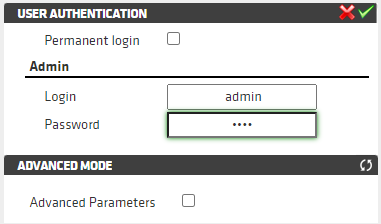
Log in with the following credentials:
Username:admin
Password:root -
Click the green tick in the top right corner:
-
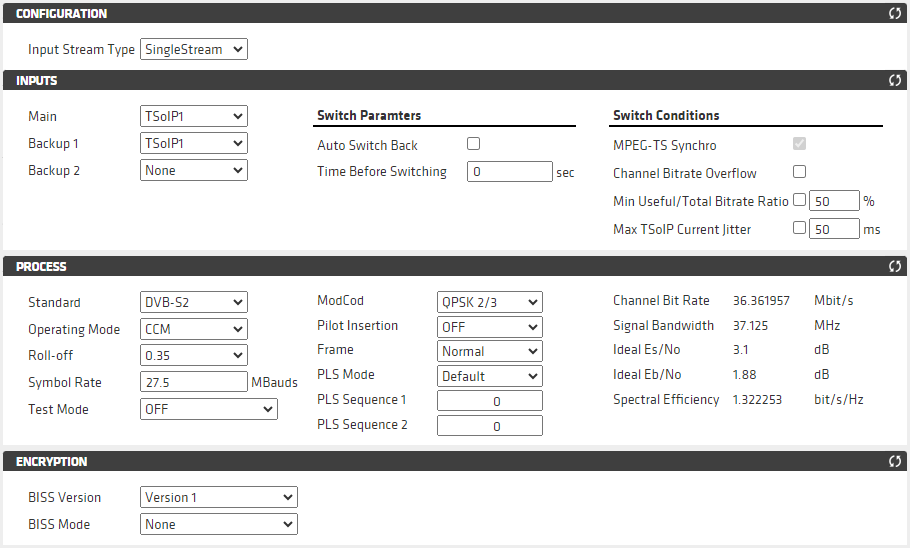
Configure modulation settings
To configure modulation settings, go to Settings then Modulation:
Configure RF output parameters
To configure RF output parameters, go to Settings then Outputs:
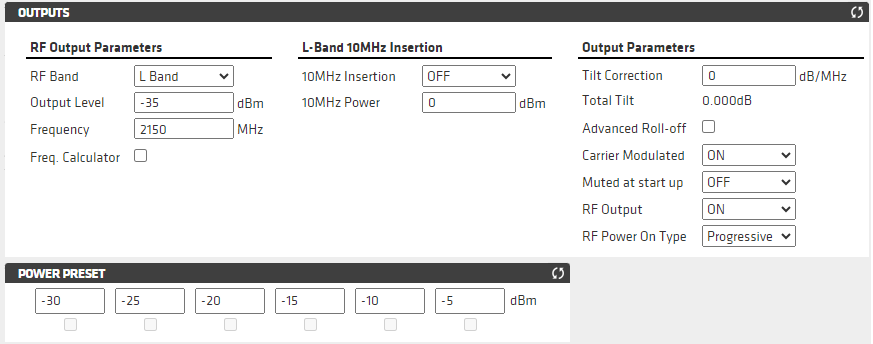
Enabling or disabling the RF output must be done on the Outputs menu.
- To disable the RF output, set the RF Output setting to OFF, then click on the green tick in the top right corner.
- To enable the RF output, set the RF Output setting to ON, then click on the green tick in the top right corner.