
LDAP configuration
By default, accessing the Controller user interface is restricted to people that have a user account defined through the MediaKind system center. You can also configure the user access by retrieving user credentials from an existing LDAP server directory.
-
Log in as a user with Administrative privileges.
-
Click
 in the upper right corner of the window.
-
Select Settings. The Settings page displays 5 tabs:
-
In the LDAP tab, configure the LDAP settings to integrate with the local LDAP server.
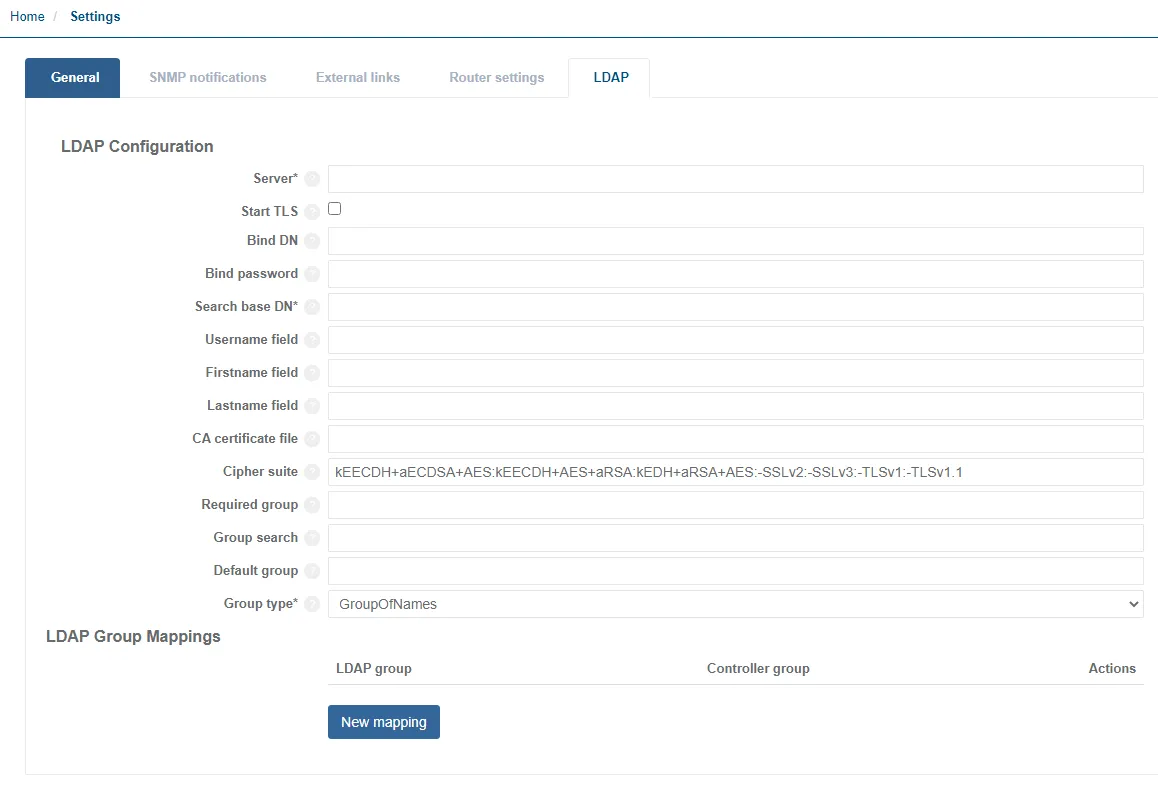
Loading LDAP certificates
If LDAP certificates are being loaded, configure LDAP on the settings page, then load the certificates.
-
On the controller server, place the LDAPS certificates in /etc/pki/ca-trust/source/anchors/
-
Run the following command:
update-ca-trust extractThis will extract it to the standard OS trust store location (default path used in the controller UI):
/etc/pki/ca-trust/extracted/pem/tls-ca-bundle.pem -
Edit the config file to set the right values:
/opt/mediakind/utility/bin/controller/ldaps.confThe conf file must contain the fully qualified domain name for the LDAP server (same as in the certificate) and the IP address of that server.
###############################################################################
#                                                                             #
# Config file used by add-ldaps-certs.sh                                      #
# Needs to be populated by the customer specific parameters                   #
#                                                                             #
###############################################################################

# newLDAPServerName must be fully resolvable
# FQDN that matches the provided root CA
newLDAPServerName=ldaps.sou.new
newLDAPServerIP=10.1.1.1
deployment=unified-ui
LDAP Field Description Example value serverAddress of the LDAP server to communicate with. ldap://fr-my.companydomain.com:389Bind DNDistinguished name to use when binding to the LDAP server; leave empty (default) for an anonymous bind. CN=apache, OU=COM, OU=Sites, DC=companydomain, DC=comBind passwordPassword to use for binding with protected binding; leave empty (default) for anonymous binding. Password123Search base DNDN to use when binding to the server in order to perform searches. Leave empty for anonymous binding. OU=COM, OU=Sites, DC=companydomain, DC=comUsername fieldName of the field to use in the LDAP search, for username matching (against LDAP attributes). sAMAccountNameFirstname fieldName of the field (from LDAP attributes) holding the user’s first name. givenNameLastname fieldName of the field (from LDAP attributes) holding the user’s last name. firstname_field&lastname_fieldshall be used together, or they will be ignored.firstname_field&lastname_fieldcan be used to retrieve the user’s full name. This will then be displayed instead of the username once the user is logged in.snCA certificate fileLocation of the CA certificate file used to verify the LDAP server’s certificate when using TLS or LDAPS. /etc/pki/ca-trust/extracted/pem/tls-ca-bundle.pemCipher suiteOpen SSL-format string defining the list of ciphers to use for TLS communication. kEECDH+aECDSA+AES:kEECDH+AES+aRSA:kEDH+aRSA+AES:-SSLv2:-SSLv3:-TLSv1:-TLSv1.1Required groupThe LDAP group required for a user to be able to log in. cn=lcl.cnt.dfw.di.mediakind.allowlogon, ou=Resources,ou=Groups, ou=MediaKind,ou=CP, dc=example,dc=orgGroup searchThe filter used to search for required group. dc=example, dc=orgDefault groupA Controller group assigned to a user that has logged in via LDAP. Mutually exclusive with ldap_group_mappingssection.MonitoringGroup typeThe type of group used to search through LDAP. NestedActiveDirectoryGroupTypeandGroupOfNamesare supported if anything other thanNestedActiveDirectoryGroupTypeit will default toGroupOfNamesNestedActiveDirectoryGroupTypeLDAP group mappingsA section that can be used to control authorisation through LDAP groups. Configure group_search(and don’t usedefault group). In the example, any user that belongs to the LDAP groupMK_Configurationwill be given the privileges for the Controller groupConfiguration.LDAP groupMK_AdminAdminMK_ConfigurationConfigurationMK_MonitoringMonitoring -
Run the script:
/opt/mediakind/utility/bin/controller/add-ldaps-server.sh
Running the script will restart the required containers.