
You can access additional menus from the Settings menu. This menu only displays if Packager, Stream Conditioning or Live Encoder products are used.
Stream Conditioning menus
- Stream Conditioning variables
Live Encoder menus
- Nielsen archiving (only available in container mode)
- Live service lineup
Enable Nielsen log archiving
When enabled, Nielsen watermarking logs are sent using an SFTP server.
Watermarking is enabled from the Live Encoding service: Media processing > Audio Processing > Watermarking >  > Insertion > Enable.
- Select Settings from the left-side menu panel to expand and display menu options.
- Select Nielsen archiving from the drop-down menu list. The Archiving options display.
- Select the check box to enable Nielsen archiving.
- Enter parameters for the SFTP server.
Live service Lineup
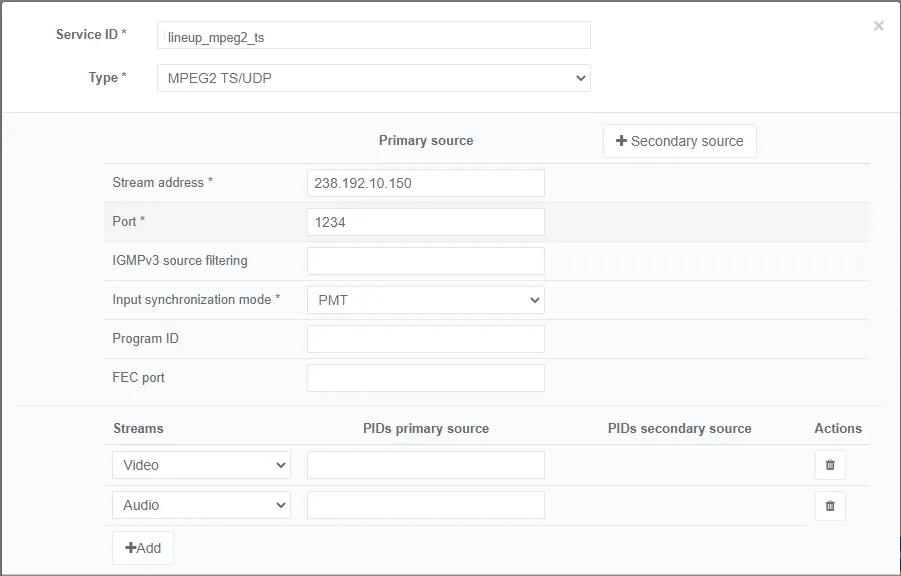
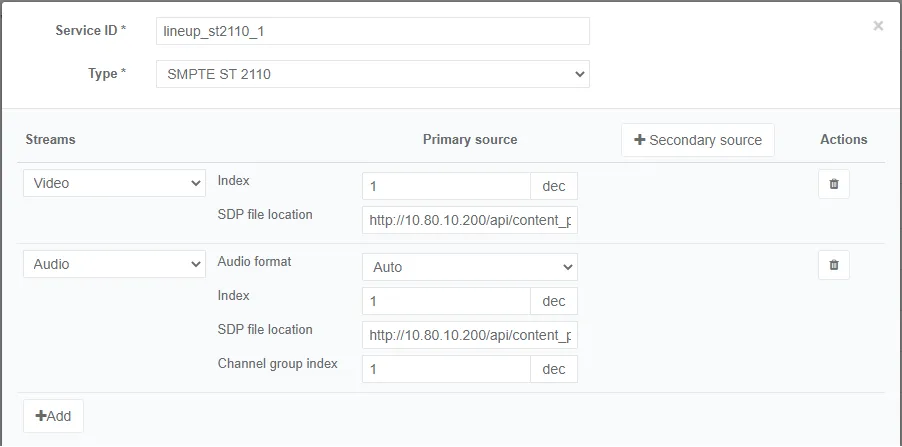
The lineup file describes a list of sources (including all the parameters needed to capture the source i.e. multicast address and port, input streams, …) to be used with the Media composer input. This configuration is unique per controller and is used by all the Live Encoder services.
To import the lineup configuration file, follow these steps:
-
Select Settings from the left-side menu panel to expand and display menu options.
-
Select Live service lineup from the drop-down menu list. The Live service lineup options display.
-
You can either create a new service lineup or import an existing one.
- To create a new service lineup, click Add then enter and/or select the appropriate value for each parameter.
- To import an existing service lineup, click Import then browse to select a service lineup (json file).
-
In the Actions column, you can click the
button to display each service lineup parameters. -
You can export an existing service lineup:
- You can either click the Export button then copy/paste the json file.
- Or right-click the Export button then select the Save link as option and browse to select a location.