
Director 6
Director 6 delivers secure, end‑to‑end management for contribution and distribution networks, with enhanced content security beyond Director 5 (not supported in Beam).
Director Features
Section titled “Director Features”Conditional Access (CA)
Section titled “Conditional Access (CA)”A Trusted Platform Module (TPM) must be fitted. If not fitted, the Director 6 functionality will be hidden. Please contact MediaKind Customer Support on how to check this.
When the Receiver Configuration Type is set to TS passthrough, it is possible to configure multiple programmes from a single MPTS to be descrambled using Director 6. For decode-oriented Receiver Configuration Types, such as SD/HD or UHD, only a single service can be configured for descrambling and decoding.
Supplying Information to the Director Headend
Section titled “Supplying Information to the Director Headend”Receivers under the control of a Director 6 headend system must be registered by supplying the Director Key File downloaded from the unit. This contains all the information necessary for the Director 6 headend to authorize decrypting scrambled content or accepting Over-Air-Control (OAC) commands.
Before you start, ensure at least one service is configured.
-
From the Home page, select the RECEIVER item from the required feed then click
 to edit
 -
From the Parameters window, select the Decrypt tab.
-
Click the Director 6 tab.
-
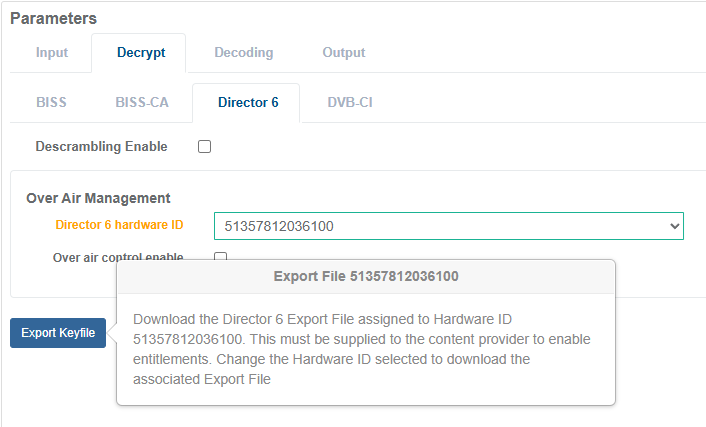
From the Director 6 hardware ID drop down list, select an ID entry that the content provider can use to address the receiver service.
-
Click Export Keyfile button to download the Director Key File.
-
If other Director 6 hardware IDs are assigned to other receiver services, repeat the above steps to export and download the Director Key File for each unique Director 6 hardware ID assignment.
-
Send the Director Key File(s) to the content provider who will manage entitlements.
Configuring Director 6 Decryption
Section titled “Configuring Director 6 Decryption”Enable Director 6 Decryption for Service Decode
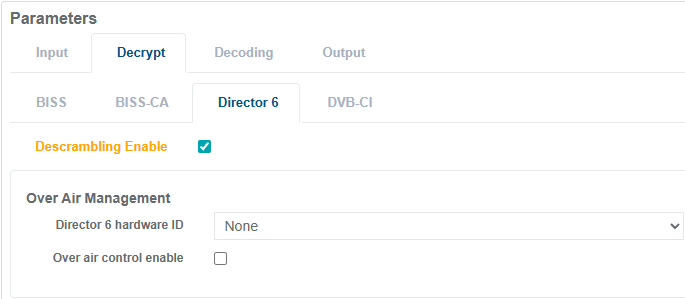
Section titled “Enable Director 6 Decryption for Service Decode”Director 6 decryption is enabled by ticking the Descrambling Enable check box in the receiver service configuration. This allows multiple service configurations to decrypt using Director 6 without being limited to the Director 6 hardware ID.
For a receiver service that has been configured for UHD or SD/HD, enable Director 6 decryption with the following steps.
-
From the Home page, select the RECEIVER item from the required feed then click
to edit -
From the Parameters window, select the Decrypt tab.
-
Click the Director 6 tab.
-
Tick the Descrambling Enable check box.
-
Once configuration is complete, click Save and Continue to apply change.
Enable Director 6 Decryption for TS Passthrough
Section titled “Enable Director 6 Decryption for TS Passthrough”For a receiver service that has been configured for TS Passthrough, enable Director 6 decryption with the following steps.
-
From the Home page, select the RECEIVER item from the required feed then click
to edit -
From the Parameters window, select the Decrypt tab.
-
Click the Director 6 tab.
-
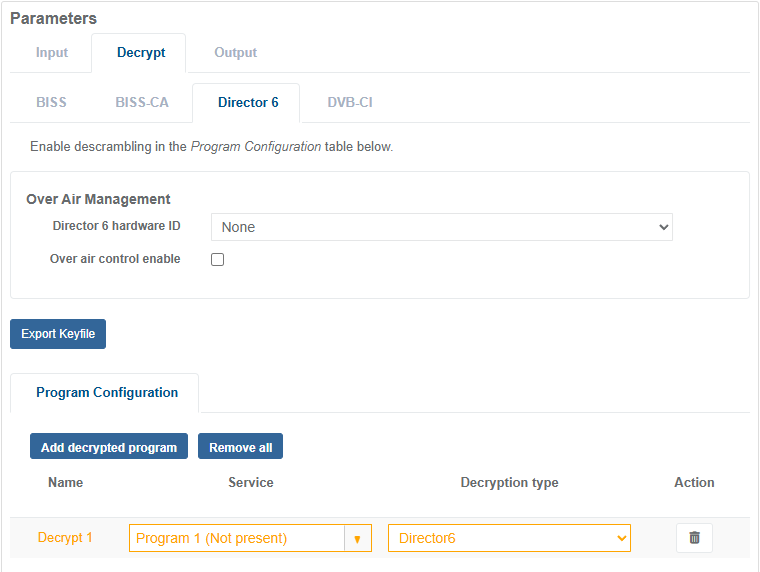
Under the Program Configuration section, click the Add Decrypted Program button.
-
A new row will appear in the decryption table, set the Service to be decrypted and set the Decryption Type to Director 6.
-
Once configuration is complete, click Save and Continue to apply change.