
Phase-Aligned Audio
Phase Aligned Audio
Section titled “Phase Aligned Audio”Phase-aligned audio (PAA) uses multiple synchronised MPEG‑1 Layer II audio components (PIDs), each carrying two audio channels. Together, these components deliver surround sound channels alongside additional audio services.
Assignment of PAA Audio Components
Section titled “Assignment of PAA Audio Components”Automatic selection of PAA components for a configured Service Selection is currently not supported. Each PAA component must therefore be manually added and configured using the guidelines below.
Audio components assigned for PAA are identified using three-letter language codes in the language descriptors, normally defined in ISO 639.
The tables below show how audio components are assigned to audio decoders based on the language descriptor, and how they should be embedded in the output (for example, SDI audio embedding).
For the first PAA group, the output channel order is as follows:
| Decode Name | Language Descriptors | Intended Output Channels | Output Embedding |
|---|---|---|---|
| Audio 1 | a,a,a (a,a,b) | 1 & 2 | Embedded 1 |
| Audio 2 | a,a,c (a,a,d) | 3 & 4 | Embedded 2 |
| Audio 3 | a,a,e (a,a,f) | 5 & 6 | Embedded 3 |
| Audio 4 | a,a,g (a,a,h) | 7 & 8 | Embedded 4 |
For the second PAA group, the output channel order is as follows:
| Decode Name | Language Descriptors | Intended Output Channels | Output Embedding |
|---|---|---|---|
| Audio 5 | b,b,a (b,b,b) | 1 & 2 | Embedded 5 |
| Audio 6 | b,b,c (b,b,d) | 3 & 4 | Embedded 6 |
| Audio 7 | b,b,e (b,b,f) | 5 & 6 | Embedded 7 |
| Audio 8 | b,b,g (b,b,h) | 7 & 8 | Embedded 8 |
Configuring PAA Decode and Output
Section titled “Configuring PAA Decode and Output”Configure PAA Decoding
Section titled “Configure PAA Decoding”To set up decode of audio components for PAA, follow these steps:
-
Configure the Service Selection, selecting a service that includes PAA content.
-
From the Parameters section, select the Decoding tab.
-
Select the Audio tab to view the audio decode table.
-
Use the Add audio decode button or Decode all input audio button to create entries in the audio decode table.
-
For each audio entry, select an audio PID from the Input drop-down list, based on the language descriptors defined in the Assignment of PAA Audio Components section above.
-
For each PAA audio entry, set the Decode channel configuration to Stereo.
Configure PAA Output
Section titled “Configure PAA Output”To set up the output of audio component for PAA, follow these steps:
-
Select the Output tab.
-
Select the tab for the output type, for example SDI 1.
-
Under the Audio tab, click Add all to automatically add all the decoded audio components already configured.
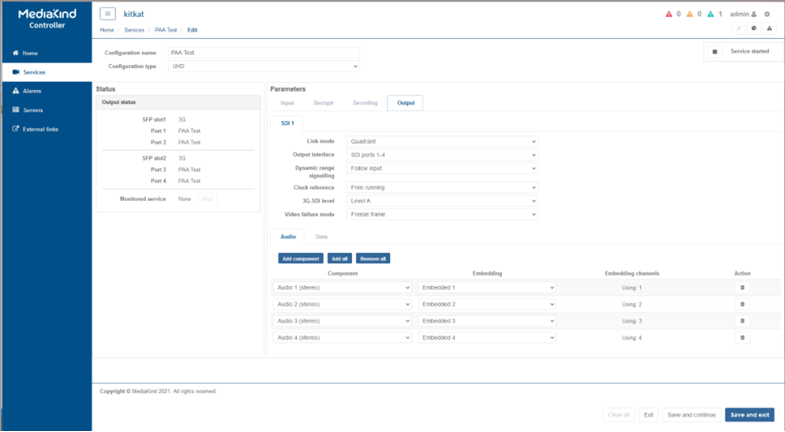
-
Click Save and Continue to apply change.