Configuring Alternate content sources
Blackout and alternate content switching is managed using ESAM (standard) communication interface. As an example, below is the response TS Splicer receives from a POIS (either in an out-of-band fashion, or following the SCTE-35 submission):
<esam:SignalProcessingNotification xmlns:common="urn:cablelabs:iptvservices:esam:xsd:common:1" xmIns:esam="urn:cablelabs:iptvservices:esam:xsd:signal:1" xmIns:md="urn:cablelabs:md:sd:signaling:3.0" signalProcessingIdentity=""> <common:StatusCode classCode="0"/> <sesam:ResponseSignal acquisitionPointIdentity="GAMEHD0100_Z1" acquisitionSignalID="70a20£66-bc00-405-a77b-944ee9£3b6b8" signalPointID="" action="create"> <md:UTCPoint utcPoint="2020-03-11T23:17:08.600Z"/> <esam:AlternateContent altContentIdentity="ECE-SLATE" zoneIdentity="zonel"/> </esam:Responsesignal></esam:SignalProcessingNotification>This response from the POIS instructs TS Splicer to switch to an alternate content which ID is ECE-SLATE. This content ID shall be mapped to a physical content.
To configure such alternate source content mapping:
- Select Settings from the left-side menu panel and display menu options.
- Select Alternate content sources.
- Source collection can be exported or imported using Import or Export button. When adding a collection the field Name will be populated automatically.
- To add a new alternate source, click the +Add button.
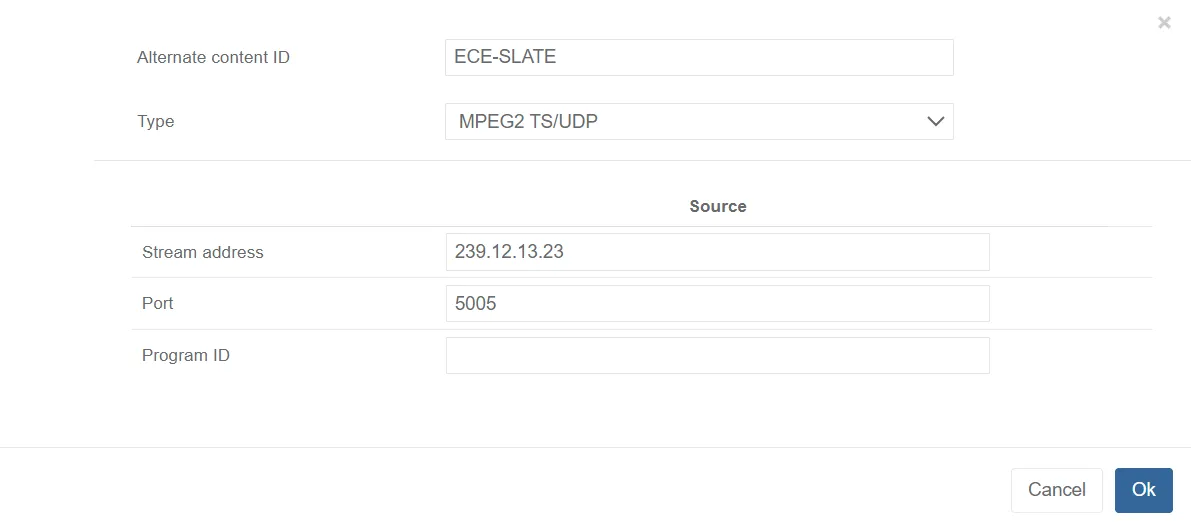
- Alternate Content ID: ID of the source, for instance: ECE-SLATE (based on previous SPN response)
- Type: Select the type of alternate content source:
- MPGE2 TS/UDP: Alternate content source is a multicast feed for which stream address, Port and Program ID (optional) must be configured.
- File: Alternate content source is mapped to a file (Transport Stream) which should be aligned with the underlying live programming.
- HLS: Alternate content source is an HLS for which the URL to manifest must be configured.