
| Parameter | Description |
|---|---|
| Codec | Specify the codec for the audio encoding. 'Passthrough' is not supported when audio input is uncompressed. For PCM or Dolby E Passthrough, select 'SMPTE302 / Dolby E Passthrough'. |
Pass-through specific parameters
| Parameter | Description |
|---|---|
| Insert audio frames on signal loss | Generate audio frames according to the input loss management configured in Media processing tab (silence, 1kHz tone) when the input source is lost. Note: If you activate this option, associated monitoring statistics are available from the Service statistics (see example below). |
| Glitch supression | Only available if Insert audio frames on signal loss is checked. Repeat 3 audio frames before enabling input loss audio frames generation. |
| Generate audio frames if no source at start | Only available if Insert audio frames on signal loss is checked. If the audio service is missing at startup, generate audio frames according to the input loss management configured in Media processing tab (silence, 1kHz tone). Frames may be encoded in a different codec from the real audio. Note: Applies to both use cases where Live Encoder is configured either with SDI or as IP input. |
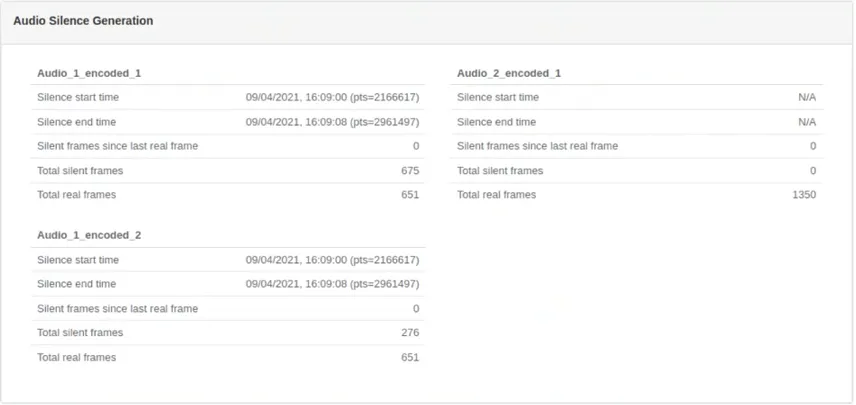 Example of audio silence generation statistics
SMPTE-302 / Dolby E Pass-through additional parameters
| Parameter | Description |
|---|---|
| Data Width | Data width of AES audio sample to be encoded. Possible values: Follow input, 16-bit, 20-bit, or 24-bit |
MPEG-1 Layer II, Dolby Digital, Dolby Digital Plus, AAC, HE-AAC, HE-AAC v2 parameters
| Parameter | Description |
|---|---|
| Watermarking | Type of watermarking insertion to use |
| Profile | Profile to use with AAC codec |
| Channels mode | Number of audio channels in the encoded audio track |
| Bit rate | Bandwidth used to encode the audio stream |
| Sampling rate | Number of audio samples per second defined in Hz |
| Frame rate | Frame rate as defined in video input |
| Blackout | This blackout configuration will be applied to the related audio/video/subtitles stream. |
Dolby Digital additional parameters
| Parameter | Description |
|---|---|
| Dialog normalization | Metadata parameter that controls playback gain. Possible values: Auto or, from -1 dB to -31 dB. Auto means that no processing will be done on the input. |
| Dolby Surround mode | Decoders can use this flag to automatically switch on Pro Logic decoding. |
| DRC Line Mode Profile | The Dynamic Range Control restricts the signal's absolute peak level for a decoder using the line mode. |
| DRC RF Mode Profile | The Dynamic Range Control restricts the signal's absolute peak level for decoder using the RF mode. |
| DC highpass filter | A DCblocking 3Hz highpass filter applied on the main Dolby channel. Used to remove DC offsets in the program audio. Only switch off in exceptional circumstances. |
Related information
Configure the audio encoding parameters