
There are different types of out-of-band metadata:
- The ESAM out-of-band signal interface allows an external module (typically a POIS) to send splice information to Live Encoder. The splice information is used by MediaKind Live Encoder to generate SCTE-35 signals and/or ad markers in the output.
- The SCTE-104/IP out-of-band interface allows an external server to send SCTE-104 over IP messages to Live Encoder that converts them in SCTE-35 to enable stream conditioning actions.
- The ID3 out-of-band allows extracting the Nielsen watermark from the input audio stream, translate it to ID3 tags and output it enabling the monitoring of the audience of each channel distributed over the Internet.
To configure out-of-band metadata input stream, follow these steps:
-
From the Input tab, go to the Metadata section then click the Add button. The Metadata selection window displays.
-
Select a Type.
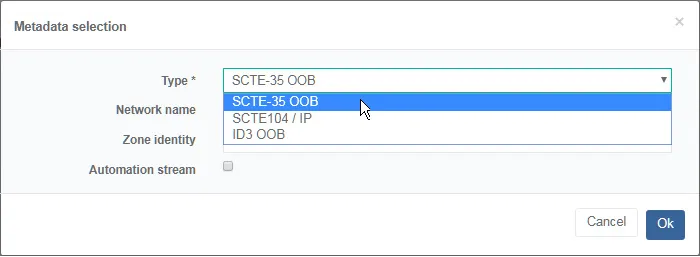 Example of configuration for SCTE-35 OOB metadata
- Enter the appropriate values for the following parameter:
- Network name
- Zone identity
- ESAM server network interface
- Click Ok to save settings and return to the service edition options. The metadata stream is added to the list.
-
Save your settings to continue or click Exit to quit without saving.
-
You can configure the metadata encoding and add the metadata to the output stream.
For ESAM out-of-band, the POIS should perform an HTTP POST request to the following URL: http://<controller.ip>:8080/api/esam/LiveEncodings/<network_name>
where:
controller.ipis the IP address used to connect to the Controller.network_nameis the unique acquisition point network name corresponding to the Live Encoder configuration to the input stream metadata.oob you create.
Configure SCTE-35 out-of-band metadata input stream
To configure SCTE-35 out-of-band metadata input stream, follow these steps:
-
From the Input tab, go to the Out-of-band streams section then click the Add button. The Metadata selection window displays.
-
Set the Type to SCTE-35 OOB.
Example of configuration for SCTE-35 OOB metadata -
Enter the appropriate value for the following parameters:
- Network name
- Zone identity
- ESAM server network interface
-
Click Ok to save settings and return to the service edition options. The metadata stream is added to the list.
-
Save your settings to continue or click Exit to quit without saving.
-
You can configure the metadata encoding and add the metadata to the output stream.
Related information
Configure blackout
Configure SCTE-104/IP out-of-band metadata input stream
To configure SCTE-104/IP out-of-band metadata input stream, follow these steps:
-
From the Input tab, go to the Out-of-band streams section, click the Add button. Metadata selection window displays.
-
Set the Type to SCTE-104 / IP OOB.
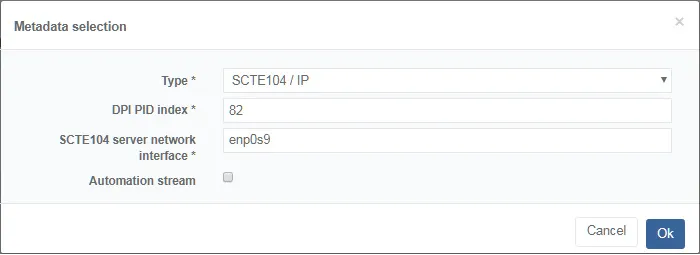 Example of configuration for SCTE-104/IP out-of-band metadata
-
Enter the appropriate value for the following parameters:
- DPI PID index
- SCTE-104 server network interface (if not already configured in the General tab).
-
Click Ok to save settings and return to the service edition options. The metadata stream is added to the list.
-
Save your settings to continue or click Exit to quit without saving.
-
You can configure the metadata encoding and add the metadata to the output stream.