
Set SDR/HDR Signalling
SDR/HDR signalling ensures that downstream devices interpret the video signal correctly and apply the appropriate display characteristics (for example, brightness, contrast, and colour gamut).
In most cases, the signalling information is extracted from the incoming transport stream. If this metadata is missing or incomplete, you can override it and explicitly specify the desired dynamic range signalling.
Dynamic Range and Color Standards
SDR and HDR describe the luminance range and transfer characteristics of a video, not the chromaticity or color primaries. ITU-R recommendations BT.601, BT.709, and BT.2020 define those color primaries and colorimetry independently of dynamic range. BT.601 covers SD, with distinct primary sets for 525-line (NTSC) and 625-line (PAL) systems; BT.709's HD primaries match BT.601's 625-line variant; BT.2020 covers the wider gamut used for UHD and HDR.
| Video Format | Dynamic Range | Color Standard |
|---|---|---|
| SD | SDR | BT.601 |
| HD | SDR | BT.709 |
| HD | HDR (PQ or HLG) | BT.2020 |
| UHD | HDR (PQ or HLG) | BT.2020 |
In practice, HDR workflows typically use BT.2020 as the color container because modern displays and delivery systems support wider gamuts, but this is a pairing choice rather than a strict requirement.
Dynamic Range Signalling
Supported Signalling Options
The two most commonly used HDR transfer functions are PQ (SMPTE ST 2084) and HLG (ITU-R BT.2100) and so these are available when selecting the Dynamic range signalling in the Receiver service configuration.
| Dynamic range signalling option | Dynamic range signalled on the output | Color standard signalled on the output |
|---|---|---|
| Follow input | - | - |
| SDR (BT.709) | SDR | BT.709 |
| SDR (BT.2020) | SDR | BT.2020 |
| HDR HLG10 | HDR HLG transfer function with 10-bit precision | BT.2020 |
| HDR PQ10 | HDR PQ transfer function with 10-bit precision | BT.2020 |
Configuring Dynamic Range Signalling
To manually set the standard to be used for SDR or HDR signalling follow the steps below:
-
On the Home page, select the RECEIVER item from the required feed, then click
 to edit.
 -
In the Parameters window, select the Output tab.
-
Select the tab for the required output type, for example SDI 1.
-
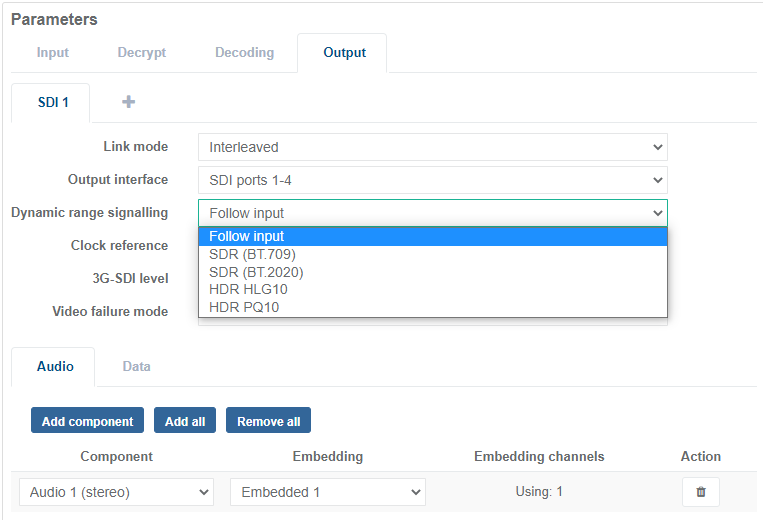
Select the appropriate setting from the Dynamic range signalling drop-down menu:
- Select Follow input to extract the video format from the incoming transport stream and embed into the output video.
- Select one of the SDR or HDR standards to override the incoming format and embed into the output video.
-
Click Save and Continue to apply change.