
Receiving and Decoding
A broadcast receiver demodulates an incoming signal and decodes the video and audio it contains, converting a compressed transport stream back into a baseband output. Receivers are a fundamental part of any workflow where content arrives over satellite or IP and needs to be decoded for monitoring, processing, or re-distribution.
MK.IO Beam’s Receiver handles both satellite and IP inputs. For satellite, it supports DVB-S, DVB-S2, and DVB-S2X standards with hardware demodulator cards. For IP, it accepts transport stream inputs directly from the network. You can route a single satellite input to multiple Receiver services, or assign each input independently.
Decoding
Section titled “Decoding”Once the transport stream is received, MK.IO Beam decodes the video and audio from the selected service. By default, the first video and audio components listed in the service Programme Map Table (PMT) are decoded automatically. Supported audio formats include MPEG-1 Layer II, Dolby Digital, and Dolby Digital Plus, as well as pass-through of formats such as Dolby E and LPCM.
See the Video Decoding and Audio Decoding sections in the technical Reference documentation for a full list of supported formats and configuration options. See Decoding configuration for details on how to configure decoding.
Outputs
Section titled “Outputs”MK.IO Beam’s Receiver delivers decoded output in several formats:
- SDI (HD, 3G SDI) for broadcast equipment and monitors.
- UHD SDI for ultra-high-definition workflows.
- SMPTE ST 2022-6 and SMPTE ST 2110 for IP-based studio and production environments.
- HDR to SDR conversion and HD downconversion for compatibility with legacy equipment.
- SCTE-35 to SCTE-104 conversion for passing ad insertion signals to downstream encoders.
Multiple outputs can be configured from a single Receiver service. See Output configuration for the full range of options.
Decryption
Section titled “Decryption”Broadcast streams are often encrypted to prevent unauthorized access. MK.IO Beam’s Receiver supports several decryption methods:
- BISS (Basic Interoperable Scrambling System): A broadcast standard for contribution and distribution encryption (BISS1, BISS2, BISS-CA).
- Director 6: MediaKind’s conditional access system which features over-air-control functionality.
- DVB-CI: A common interface standard that uses a removable Conditional Access Module (CAM).
See Decryption configuration for setup details.
Receiver Configuration Type
Section titled “Receiver Configuration Type”When a Receiver service is created by adding a Feed, one or more services are generated from a template. In this case, the Receiver service Configuration Type is selected automatically based on the chosen Feed type.
Alternatively, when creating a service directly, you are prompted to select the Configuration Type if it is a Receiver service.
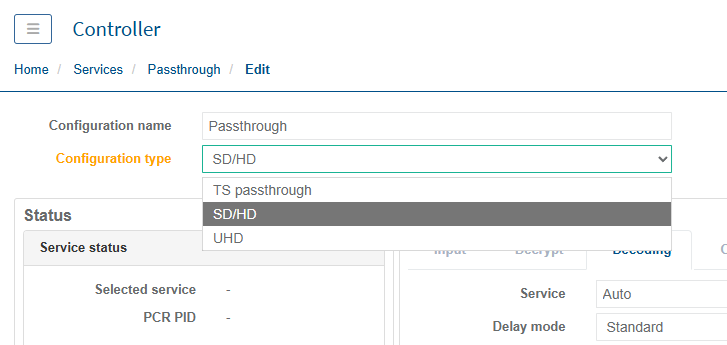
The Configuration Type determines the behaviour of the Receiver service, as shown in the table below. It can be changed at any time as part of the Receiver service configuration.
| Configuration Type | Description |
|---|---|
| TS passthrough | Does not decode video, audio, or data, but supports descrambling. The input transport stream is then output as an IP/UDP multicast. |
| SD/HD | Decodes video (SD and HD), audio, and data, and supports descrambling, with output in formats such as SDI. |
| UHD | Decodes video (SD, HD, and UHD), audio, and data, and supports descrambling, with output in formats such as SDI. Includes additional UHD-specific configuration settings. |
If the selected Configuration Type is not appropriate, some configuration settings may be unavailable in the web interface, or the Receiver service may be prevented from starting and entering the Running state.
If the service is blocked from starting, an alarm is raised indicating that the service configuration is incompatible with the selected Configuration Type. Refer to the alarm description for guidance on resolving the issue and bringing the service into the Running state.
Change the Configuration Type
Section titled “Change the Configuration Type”To change the configuration type for an existing Receiver service:
-
From the Home page, select the RECEIVER item from the required feed then click
 to edit.
 -
Select the appropriate type from the Configuration Type drop-down list.
-
Click Save and Continue to apply change.
Common use cases
Section titled “Common use cases”- Receiving satellite-delivered channels for headend or monitoring workflows.
- Decoding IP contribution feeds for production or re-encoding.
- Converting encrypted broadcast streams to baseband for downstream processing.
For reception solution guides, see Reception.