
Configure audio output
The Receiver service supports a maximum of 16 channels (8 stereo pairs) of embedding for any baseband audio output.
Before you start, ensure:
- At least one Receiver service is configured.
- A video service and at least 1 audio component is configured to be decoded.
Add an output audio component
Section titled “Add an output audio component”-
From the Home page, select the required field.
-
Select the RECEIVER item from the required feed then click
 .
. -
From the Parameters section, select Output to display options.
-
Go to the Audio tab to open the tab and display options then select Add component. An audio component displays.
-
Configure audio output parameters.
Lipsync may be adjusted in the range +- 50mS. In low delay modes negative lip-sync adjustments may not be possible.
Add all output audio
Section titled “Add all output audio”-
From the Home page, select the RECEIVER item from the required feed then click
. -
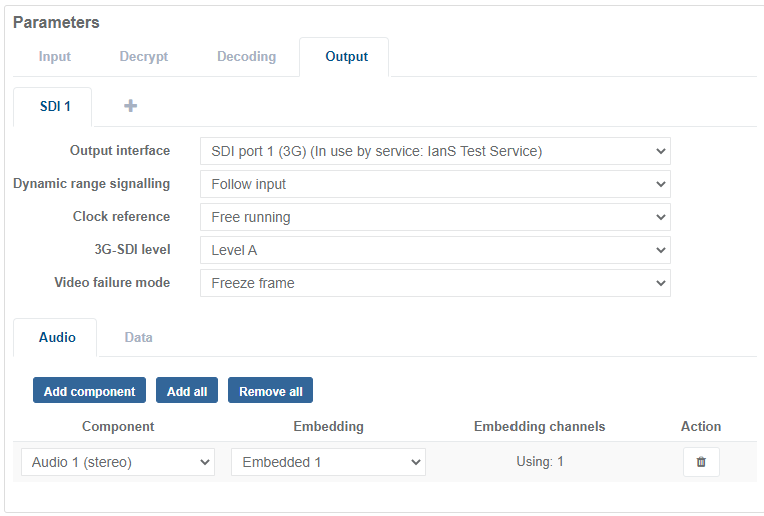
From the Parameters section, select Output to display options.
-
Go to the Audio tab then select Add all. All the decoded audio components that are not currently included in the output audio configuration are added to the component column (up to a maximum number of embedded channels available for the output video format in use). Embedded channels are allocated in sequence until all available channels are filled.
Delete an output audio
Section titled “Delete an output audio”-
From the Home page, select the RECEIVER item from the required feed then click
. -
From the Parameters section, select Output to display options.
-
Go to the Audio tab then click
 in the Actions column. The audio component no longer displays.
Delete all output audio
Section titled “Delete all output audio”-
From the Home page, select the RECEIVER item from the required feed then click
. -
From the Parameters section, select Output to display options.
-
Go to the Audio tab then select Remove all. All the audio components are now removed from the list of output configurations.
Configure Audio Embedding
Section titled “Configure Audio Embedding”-
From the Home page, select the RECEIVER item from the required feed then click
. -
From the Parameters section, select Output to display options.
-
Go to the Audio tab then select a Component from the drop-down list. Available audio components are based on the audio being decoded for the service.
-
Select an Embedding position from the drop-down list.
- A single Embedded channel is required to output a stereo audio.
- 3 Embedded channels are required to output a 5.1 audio.
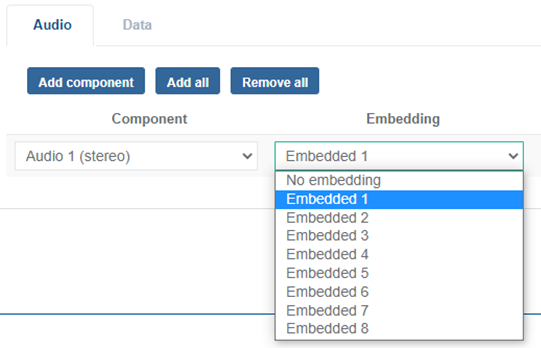
Each audio component is embedded into the output SDI at the selected position.
Output Format Embedded options 1.5G SDI (720p/1080i) Embedded 1 to 8 3G SDI (1080p) Embedded 1 to 16 4 x 3G SDI (2160p) Embedded 1 to 16 12G SDI (2160p) Embedded 1 to 16