
For a Receiver service to output decoded UHD video in the same format, the Configuration Type must be set to UHD. This Configuration Type enables decoding of SD, HD, and UHD video and exposes additional settings for UHD output.
UHD Output Over SDI
UHD video is output over SDI using the following SDI output standards, referred to as Link Mode:
- Quadrant (Quad‑Link 3G‑SDI, ST 425‑5 Annex B — Square Division)
- Interleaved (Quad‑Link 3G‑SDI, ST 425-5 Two Sample Interleave)
- 12G-SDI (Single‑link UHD)
Configuring Link Mode
To configure the Link Mode for UHD output for a specific Receiver service, follow these steps:
-
Set the Configuration Type is set to UHD:
-
Set the SDI output option card so that it is configured for UHD output:
-
On the Home page, select the RECEIVER item from the required feed, then click
 to edit.
 -
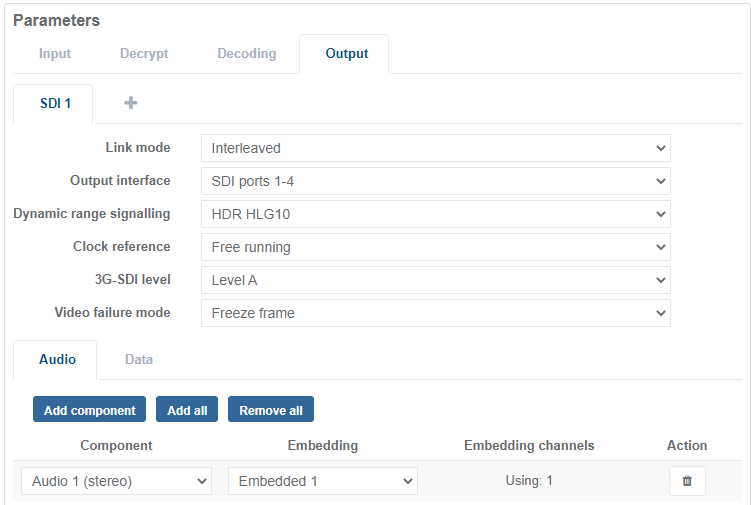
In the Parameters window, select the Output tab.
-
Select the tab for the SDI output type, for example SDI 1.
-
Select the Link Mode format required for the video output.
-
Select the SDI port required from the drop-down menu that supports UHD output.
-
Click Save and Continue to apply change.
UHD Output Over SMPTE ST 2022-6
Currently, UHD output is not supported using SMTPE ST 2022-6.
UHD Output Over SMPTE ST 2110
To output UHD video using SMPTE ST 2110, ensure the following settings are configured:
-
Set the Output Profile to SMPTE ST 2110 UHD Output:
-
Set the Configuration Type is set to UHD: